







Priya initially mistook computer vision for simple image classification - a world of “cats vs dogs”, but as she dove deeper, she realized the field had evolved far beyond static labels. Today’s AI doesn’t just see; it understands — identifying objects, tracking movement, and even interpreting human behavior in real time.
Her curiosity led her to YOLO (You Only Look Once) — an algorithm that forever changed how machines perceive visual data. Unlike traditional models that analyzed images piece by piece, YOLO could detect and classify multiple objects in a single glance, almost instantly. It was fast, efficient, and astonishingly accurate — a true leap forward for real-time vision systems.
As we step into 2025, YOLO has become the backbone of applications ranging from autonomous vehicles to smart surveillance, reshaping how machines perceive the world.
What started as a curiosity about “cats vs dogs” has evolved into an exploration of how computers truly see — and YOLO stands at the center of that revolution.
Summary
This course is designed for beginners who want to explore the exciting world of computer vision, learn how YOLO works, and gain hands-on experience with real projects.
Throughout the course, you will:
- Learn the fundamentals of YOLO, including its architecture, detection process, and evolution from YOLOv1 to YOLOv8.
- Understand why YOLO is so popular for real-time detection and how it differs from other AI models.
- Get familiar with essential tools and learn to set up your first project.
- Build practical projects, such as detecting objects in images and videos, and even reading vehicle license plates using YOLO combined with OCR.
- Explore the career opportunities that come with YOLO skills, from AI and robotics roles to computer vision-focused positions.
Table of Contents
| S.No. | Sections | Subsections | What You’ll Learn (Simple Summary) |
|---|---|---|---|
| 1 | Welcome to the World of YOLO | When Machines Start Seeing | Learn how devices like cameras, cars, and phones “see” using YOLO’s instant object recognition. |
| Why YOLO Matters in 2025 | Understand why YOLO is essential in 2025 for robots, drones, smart cars, and mobile cameras. | ||
| 2 | Getting to Know YOLO | What Exactly Is YOLO? | Understand what “You Only Look Once” means and how YOLO detects objects in real time. |
| The Story Behind YOLO | Explore YOLO’s evolution from YOLOv1 → YOLOv8 and why it became industry-standard. | ||
| 3 | How YOLO Works | How YOLO Detects Things | Learn how YOLO scans an image once, divides it into grids, and identifies objects instantly. |
| The Secret Recipe of YOLO | Simple explanation of how YOLO learns from images and improves accuracy. | ||
| 4 | Why You Should Learn YOLO | Cool Careers Using YOLO | Discover job roles in AI, robotics, automation, and computer vision using YOLO skills. |
| Your YOLO Toolbox | Get familiar with Darknet, OpenCV, YOLO frameworks, and required tools. | ||
| Setting Up Your First YOLO Project | Step-by-step process to set up YOLO and run your first detection model. | ||
| 5 | YOLO Project: License Plate Detection | How YOLO Detects Number Plates | Build a project where YOLO identifies vehicle number plates. |
| 6 | YOLO Project: Real-time Detection | How YOLO Detects Real-world Objects | Create a live object detection system using your webcam. |
| 7 | YOLO in Real Life | YOLO in Everyday Life | Explore real-world uses: self-driving cars, shopping apps, healthcare, security, and more. |
| Amazing Real-World Stories | Simple success stories (doctors detecting diseases, farmers monitoring crops). | ||
| 8 | YOLO vs Other AI Models | How YOLO is Different | Compare YOLO with Faster R-CNN, SSD, and understand its strengths. |
| Why Speed Matters in AI Vision | Why fast detection is crucial for cars, drones, and live video processing. | ||
| 9 | The Future of YOLO | What’s Next for YOLO? | Explore YOLOv9+ and upcoming breakthroughs in AI vision. |
| 10 | Conclusion | — | Wrap-up and next steps to continue mastering YOLO. |
| 11 | Additional Readings | — | Extra books, blogs, and research papers for deeper learning. |
Welcome To The World of YOLO
When Machines Start Seeing
Imagine if your phone or car could instantly recognize objects around it — like people, cars, or pets — just by looking at them. That’s exactly what YOLO does. YOLO (You Only Look Once) is a smart AI technology that helps computers see and identify things in real time. From smart cameras to self-driving cars, YOLO lets machines “see” the world like humans do, but faster and more accurately.
Why YOLO matters in 2025?
In today’s AI-driven world, being able to make machines understand what they see is a huge advantage. YOLO is widely used because it’s fast, accurate, and easy to deploy. Whether it’s tracking packages in warehouses, monitoring traffic, or helping drones navigate, YOLO is everywhere. Learning YOLO in 2025 sets you up for jobs in AI, robotics, data science, and cutting-edge tech.
Getting To Know YOLO
What Exactly is YOLO?
YOLO stands for “You Only Look Once”, and that name captures its essence perfectly. Unlike traditional object detection models, which often scan an image multiple times or in a sliding window fashion, YOLO processes an image in a single forward pass. This makes it exceptionally fast, allowing for real-time detection, even on videos or live camera feeds.
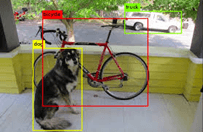
At its core, YOLO solves the object detection problem by answering three questions for every part of the image:
1. Where are the objects? — By predicting bounding box coordinates.
2. What are the objects? — By assigning class probabilities to each bounding box.
3. How confident is the model? — By calculating a confidence score for each prediction.
The Story Behind YOLO
YOLO wasn’t built overnight — it has a fascinating journey. It was first introduced by Joseph Redmon in 2015, and since then, it has gone through several versions, from YOLOv1 to the latest YOLOv8. Each new version improved speed, accuracy, and flexibility, making YOLO one of the most popular tools for real-time object detection.
Here’s a quick distinction between the major YOLO versions:
YOLOv1 (2015): The original YOLO introduced the concept of single-pass object detection using a grid system. It was fast but had limitations in detecting small objects accurately.
YOLOv2 / YOLO9000 (2017): Improved accuracy and speed, introduced anchor boxes for better bounding box predictions, and could detect over 9000 object classes.
YOLOv3 (2018): Added a deeper network (Darknet-53 backbone), multi-scale predictions, and improved detection of small objects.
YOLOv4 (2020): Focused on higher accuracy and efficiency, using modern techniques like CSPDarknet53 backbone, Mosaic data augmentation, and Self-Adversarial Training.
YOLOv5 (2020): Lightweight and easier to use, implemented in PyTorch, making it accessible for beginners and fast to deploy.
YOLOv8 (2023): The latest version, optimized for real-time detection, supports both images and video, comes with pre-trained models, and integrates smoothly with Python libraries like ultralytics.
Over the years, YOLO has become widely used in research, industry, and everyday technology. Today, YOLO is not just a model — it’s a whole ecosystem of tools, tutorials, and pre-trained models that make object detection accessible even for beginners.
How YOLO Works?
How YOLO Detects Things?
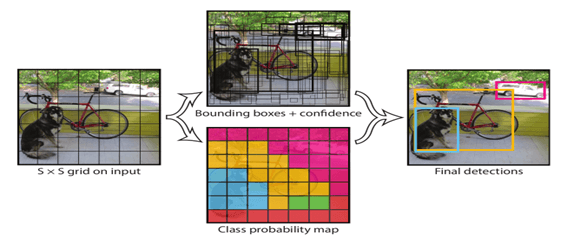
YOLO detects objects in real time by processing an image in a single forward pass. Here’s what happens step by step:
1. Input: The image is resized and pixel values are normalized.
2. Feature Extraction: The backbone CNN extracts important features such as edges, shapes, and textures. The backbone outputs feature maps at different spatial resolutions (low-level fine detail and high-level semantic info).
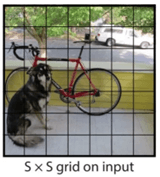
3. Grid Prediction: YOLO divides the image into an S × S grid. Each grid cell predicts bounding boxes and class probabilities.
Each grid cell is responsible for predicting objects whose center falls inside that cell.
For each grid cell the model predicts a fixed number B of bounding box candidates and class probabilities for C classes.
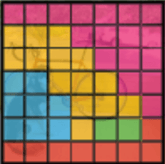
4. Anchor Box Adjustment: Anchor boxes are predefined box shapes (width × height) that act as starting guesses for object sizes and aspect ratios. Pre-defined anchor boxes are adjusted to fit the objects in the image.
This helps the model handle varied object shapes and improves convergence.
5. Score Calculation: Confidence score × class probability determines how likely the object is correctly detected.
For each predicted box the final detection score = objectness_score * class_probability.
- objectness_score (confidence) = how likely the box contains any object and how well it fits.
- class_probability = probability of each class conditioned on there being an object.
6. Non-Max Suppression (NMS): Overlapping boxes are removed, keeping the most confident predictions.
7. Output: The model outputs final bounding boxes with object classes and confidence scores.
The Secret Recipe of YOLO
YOLO’s speed and accuracy come from its clever architecture and design:
- Grid System: Divides the image into an S × S grid. Each grid cell is responsible for detecting objects whose center lies inside it.
- Bounding Boxes: Each box predicts x, y (center), w, h (size), and a confidence score.
- Anchor Boxes: Pre-set shapes that the model adjusts to fit objects of different sizes.
- Backbone Network: A CNN (like Darknet-53, CSPDarknet53, or lightweight CNNs) extracts features from the image — edges, textures, shapes, and parts of objects.
- Detection Head: Uses the backbone’s features to predict bounding boxes, class probabilities, and confidence scores.
By combining predictions across the grid and applying Non-Max Suppression, YOLO becomes highly accurate while remaining fast.
Why You Should Learn YOLO?
Cool Careers Using YOLO
YOLO isn’t just a tool — it’s a career booster. Real-time object detection is in high demand across many industries, and knowing how to use YOLO can open doors to exciting roles. Some of them are:
Computer Vision Engineer: Design and implement AI models that allow machines to “see” and understand images and video. YOLO is often a core tool for real-time object detection tasks.
Robotics Engineer: Build intelligent robots that can identify and interact with objects, requiring knowledge of YOLO for perception systems.
Autonomous Vehicle Engineer: Develop perception systems for self-driving cars and drones where object detection is critical.
Getting Started with YOLO
Your YOLO Toolbox
YOLO comes alive through various tools and frameworks that make it easy to train, test, and deploy object detection models. Some of the popular ones are:
Darknet - The original framework created by Joseph Redmon, written in C and CUDA.
Features:
- Supports YOLOv1 to YOLOv4
- Lightweight and fast
- Easy to run pre-trained models
PyTorch Implementations - PyTorch-based versions of YOLO, developed for flexibility and ease of use. It is perfect for learning, experimentation, and deployment.
Features:
- Pre-trained models ready for fine-tuning
- Supports custom datasets
- Modular and easy to integrate with other Python libraries
OpenCV - A computer vision library for Python, C++, and Java.
Features:
- Load YOLO models and run detections on images and videos
- Draw bounding boxes and labels
- Works well for deployment in desktop and mobile apps
TensorFlow / Keras Implementations - TensorFlow versions of YOLO for those who prefer TensorFlow ecosystem. It is Good for training custom models and integrating with AI pipelines.
Setting Up Your First YOLO Project
To see YOLO in action, we can load a pre-trained YOLOv8 model and detect objects in a sample image using the ultralytics library in python.
The ultralytics library includes YOLOv8 models, sample images, and all necessary dependencies.
First, Install the library
!pip install ultralytics
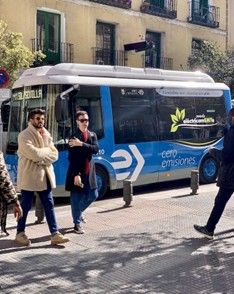
We will use a sample image from the web,
https://ultralytics.com/images/bus.jpg
Now, we load the pre-trained YOLOv8 model and run object detection
from ultralytics import YOLO
# Load a pre-trained YOLOv8 model
model = YOLO('yolov8n.pt')  # 'n' = nano (small, fast model)
# Use a sample image from the web
img_url = 'https://ultralytics.com/images/bus.jpg'
# Run detection
results = model(img_url)
# Display the output image with bounding boxes
results[0].show()
The model() function runs YOLOv8 on the input image.
It returns a list of Results objects, one for each image you pass. (Even if you provide just one image, the result is still a list with one element)
Here, results[0] accesses the first (and only) Results object in the list.
Output:
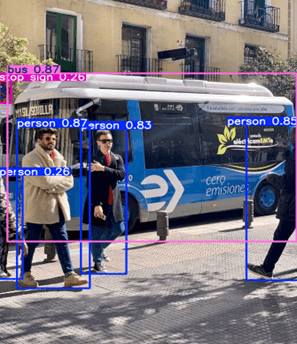
After running YOLO, we can see that
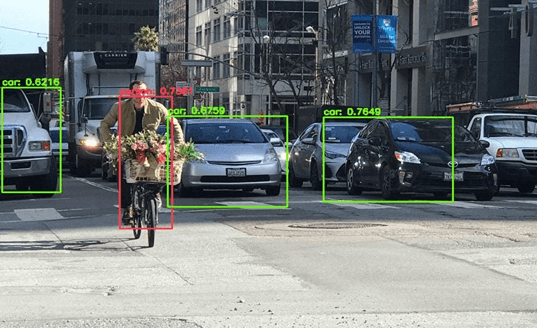
Each detected object is highlighted with a colored box (Bounding boxes).
The model detected objects such as people, bus and a bus stop sign.
The class name (like bus or person) is displayed above the box.
A confidence score (between 0 and 1) shows how sure the model is about the detection.
For example, The bus has a confidence score of 0.87, this means that the model is 87% confident that the object is a bus.
Project: Reading Vehicle License Plates
In this project, we’ll combine YOLO-based detection and EasyOCR to automatically detect and read vehicle license plates. This is a great way to see object detection and text recognition in action.
1. We need a few Python libraries for this project:
EasyOCR: For reading text from images.
imutils: Helps with image processing tasks like resizing and contours.
!pip install easyocr
!pip install imutils
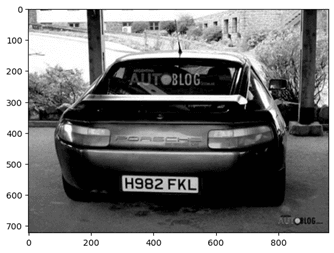
2. Now, lets load the image and convert to grayscale

Converting to grayscale simplifies the image, reducing complexity and helping edge detection work better.
import cv2
from matplotlib import pyplot as plt
import numpy as np
import imutils
import easyocr
# Load the image
img = cv2.imread('image4.jpg')
# Convert the image to grayscale
gray = cv2.cvtColor(img, cv2.COLOR_BGR2GRAY)
# Display the grayscale image
plt.imshow(cv2.cvtColor(gray, cv2.COLOR_BGR2RGB))
Output:
3. Reducing Noise and detecting edges
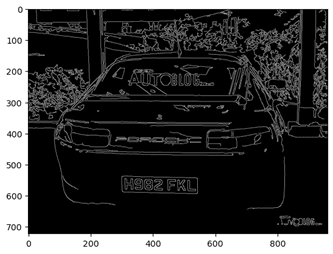
Bilateral filter: Smooths the image to remove small noise but preserves edges.
Canny edge detection: Finds the boundaries of objects in the image, which helps locate rectangular license plates.
bfilter = cv2.bilateralFilter(gray, 11, 17, 17)  # Reduce noise while keeping edges sharp
edged = cv2.Canny(bfilter, 30, 200)  # Detect edges in the image
plt.imshow(cv2.cvtColor(edged, cv2.COLOR_BGR2RGB))
4. Find Contours and Identify the License Plate
Contours are curves joining continuous points of the same color or intensity.
We sort by area and pick the top ones because license plates are usually large rectangles in the image.
We approximate each contour to a polygon and check for 4 corners to identify a rectangular license plate.
# Find contours in the edged image
keypoints = cv2.findContours(edged.copy(), cv2.RETR_TREE, cv2.CHAIN_APPROX_SIMPLE)
contours = imutils.grab_contours(keypoints)
contours = sorted(contours, key=cv2.contourArea, reverse=True)[:10]
# Look for rectangular contour (license plate)
location = None
for contour in contours:
   approx = cv2.approxPolyDP(contour, 10, True)
   if len(approx) == 4:  # License plates are usually rectangular
       location = approx
       break
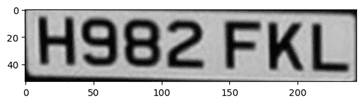
5. Mask and Crop the license Plate
We create a mask to isolate only the license plate area.
Using bitwise operations, we remove everything else in the image.
Cropping makes it easier for OCR to focus on the relevant part.
mask = np.zeros(gray.shape, np.uint8)
new_image = cv2.drawContours(mask, [location], 0, 255, -1)
new_image = cv2.bitwise_and(img, img, mask=mask)
plt.imshow(cv2.cvtColor(new_image, cv2.COLOR_BGR2RGB))
# Crop the license plate area
(x, y) = np.where(mask == 255)
(x1, y1) = (np.min(x), np.min(y))
(x2, y2) = (np.max(x), np.max(y))
cropped_image = gray[x1:x2+1, y1:y2+1]
plt.imshow(cv2.cvtColor(cropped_image, cv2.COLOR_BGR2RGB))
Output:
6. Reading the Text Using EasyOCR
EasyOCR analyzes the cropped image and reads any text present.
The result contains detected text, bounding box, and confidence score.
We extract the detected license plate number for display.
reader = easyocr.Reader(['en'])
result = reader.readtext(cropped_image)
# Extract the text from OCR result
text = result[0][-2]
text
Output:
'H982 FKL'
7. Displaying the License Plate on the Image
We draw a rectangle around the license plate and overlay the detected text.
This visually confirms that YOLO + OCR successfully detected and read the license plate.
font = cv2.FONT_HERSHEY_SIMPLEX
res = cv2.putText(img, text=text, org=(approx[0][0][0], approx[1][0][1]+60),fontFace=font, fontScale=1, color=(0,255,0), thickness=2, lineType=cv2.LINE_AA)
res = cv2.rectangle(img, tuple(approx[0][0]), tuple(approx[2][0]), (0,255,0), 3)
plt.imshow(cv2.cvtColor(res, cv2.COLOR_BGR2RGB))
Output:
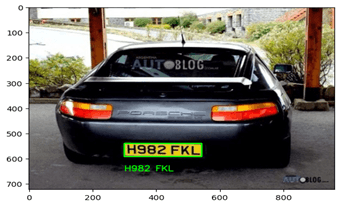
This project is a great example of how YOLO-style vision systems work in real life — detecting, isolating, and interpreting objects from an image. By combining OpenCV, contour detection, and EasyOCR, you’ve just built a mini version of an automated license plate reader, the same kind used in traffic and security systems worldwide.
Project: Real-time Object Detection with webcam
After learning how YOLO detects objects in images, let’s take it one step further — real-time detection using your webcam!
In this project, you’ll use a pre-trained YOLOv8 model to identify and classify objects around you live on camera. It’s a fun and practical way to see YOLO’s speed and accuracy in action.
1. Installing the Required libraries
pip install ultralytics opencv-python matplotlib
2. Load the YOLOv8 Model
Here, we load the YOLOv8 Nano model, which is small and fast enough for real-time processing.
from ultralytics import YOLO
import cv2
import numpy as np
model = YOLO('yolov8n.pt')
3. Capture and process webcam feed
We’ll use OpenCV to access your webcam and process frames one by one:
def webcam_detection():
   cap = cv2.VideoCapture(0)  # 0 = default webcam
   while True:
       ret, frame = cap.read()
       if not ret:
           print("Failed to grab frame!")
           break
This loop captures each video frame continuously from your webcam.
4. Apply YOLO Object Detection
       results = model(frame)
       for r in results:
           annotated_frame = r.plot()
           cv2.imshow("Real-Time YOLO Object Detection", annotated_frame)

Each frame is analyzed by YOLO, which detects objects and labels them (e.g., “person”, “cup”, “laptop”) on the screen.
5. Exiting the program
You can stop the program anytime by pressing the q key.
       if cv2.waitKey(1) & 0xFF == ord('q'):
            print("Exiting...")
            break
   cap.release()
   cv2.destroyAllWindows()
6. Running the live detection system
webcam_detection()
This project shows how YOLO brings computer vision to life — literally. You’ve just built a system that sees and understands the world around it in real time. From here, you can expand your project to detect specific objects, count people, or even track motion — the foundation for many powerful AI vision applications.
Complete Project:
# Install necessary dependencies
# Run the following commands in your terminal before running the script
# pip install ultralytics opencv-python matplotlib
# Exit the Script: Press the q key to exit the webcam feed and close the application.

from ultralytics import YOLO
import cv2
import numpy as np

# Load the pre-trained YOLOv8 model (small version for speed)
model = YOLO('yolov8n.pt')  # You can change this to yolov8s.pt or other models for better accuracy

# Function to capture webcam feed and perform detection
def webcam_detection():
  # Open the webcam feed (0 is the default camera)
  cap = cv2.VideoCapture(0)

  while True:
      ret, frame = cap.read()  # Capture frame from webcam
      if not ret:
          print("Failed to grab frame!")
          break

      # Perform YOLO object detection
      results = model(frame)

      # Annotate the frame with detected bounding boxes
      annotated_frame = results[0].plot()

      # Display the annotated frame using OpenCV's imshow
      cv2.imshow("Real-Time YOLO Object Detection", annotated_frame)

      # Break the loop when 'q' key is pressed
      if cv2.waitKey(1) & 0xFF == ord('q'):
          print("Exiting...")
          break

  # Release the webcam and close any OpenCV windows
  cap.release()
  cv2.destroyAllWindows()

# Run the webcam detection
if __name__ == "__main__":
  webcam_detection()
YOLO In Real Life
YOLO In Everyday Life
YOLO isn’t just a classroom concept — it’s powering many tools you use every day.
Some of the real-world applications are:
Smartphone Cameras: YOLO helps your camera detect faces, pets, and objects in real time for features like portrait mode or auto-focus.
Self-Driving Cars: YOLO helps cars detect pedestrians, traffic lights, and other vehicles instantly — critical for road safety.
Retail & Shopping: Smart stores use YOLO to count people, track items, and prevent theft.
Healthcare: YOLO assists doctors by detecting tumors or counting cells in scans faster and more accurately.
Drones & Robots: From crop monitoring to warehouse management, YOLO helps machines “see” their surroundings safely.
Amazing Real-World Stories
From making roads safer to helping people see and improving workplace safety, YOLO has found its way into real products and real solutions. Let’s explore a few fascinating stories where YOLO made a real difference.
1. Autonomous Vehicles & 3D Object Detection
In a study titled “Using a YOLO Deep Learning Algorithm to Improve the Accuracy of 3D Object Detection by Autonomous Vehicles”, researchers applied YOLOv4 to camera data and sensor fusion in self-driving vehicle systems. They found that YOLO delivered high overlap (IoU) and mean average precision (mAP) scores, outperforming older vision methods.
https://www.mdpi.com/2032-6653/16/1/9
2. Assistive Technology for Visually Impaired People
In another project from the Institute of Research in Applied Science & Engineering Technology, a system used YOLOv3 to help visually impaired individuals recognise objects in their surroundings.
Here YOLO acts as an every-day assistive tool, moving beyond just tech for cars and drones to help people navigate real physical environments.
YOLO can be used for social good too. Your skills could help build tools for accessibility, not just commercial applications.
https://www.ijraset.com/research-paper/yolo-based-object-detection-for-visually-impaired-individuals
YOLO Vs Other AI Models
How YOLO Is Different?
When it comes to object detection, YOLO stands apart from older models like Faster R-CNN and SSD because of its speed-first design. Traditional object detectors work in two stages — first generating region proposals (possible object areas), then classifying them one by one. This approach is accurate but slow.
YOLO takes a single-shot approach — it looks at the entire image once and predicts all bounding boxes and class probabilities in a single forward pass.
YOLO Stands out:
Real-Time Performance: YOLO can process 30–120 frames per second, perfect for videos and live feeds.
Unified Architecture: It combines detection and classification into one neural network, making it simple and efficient.
Context Awareness: Because YOLO sees the full image at once, it makes fewer mistakes on background confusion (like mistaking a tree branch for a bird).
Continuous Improvement: New versions (YOLOv5–v8) have made YOLO both faster and more accurate, balancing real-time inference with deep learning power.
Why Speed Matters in AI Vision?
In the world of computer vision, speed can be the difference between success and failure. Whether it’s a self-driving car making a split-second decision or a security camera detecting motion, AI must react instantly to what it sees.
Speed in detection is important as a delay of even 0.1 seconds can cause an accident in self-driving vehicles. In security and surveillance, Fast detection means quicker response times when recognizing suspicious activity or unauthorized access.
That’s exactly where YOLO shines. Its real-time detection capability means it can process live video frames almost as fast as the camera captures them — typically over 30 frames per second (FPS), depending on the version and hardware.
YOLO’s ability to balance accuracy with lightning-fast detection is what makes it the gold standard for real-time AI vision.
The Future of YOLO
What’s Next For YOLO?
YOLO has come a long way from YOLOv1 to YOLOv8, and its evolution is far from over.
YOLOv9, released in February 2024, marks a significant leap forward in real-time object detection. Building upon previous versions, it introduces several key innovations:
Programmable Gradient Information (PGI): This method addresses the vanishing gradient problem in deep neural networks, ensuring more accurate gradient updates during training. PGI enhances feature extraction and improves learning efficiency, leading to better performance even with fewer parameters.
Generalized Efficient Layer Aggregation Network (GELAN): GELAN optimizes lightweight models by improving gradient flow and feature aggregation. It achieves high accuracy while maintaining computational efficiency, making it suitable for deployment on resource-constrained devices.
Dynamic Box Anchoring and Enhanced Non-Maximum Suppression: These improvements allow YOLOv9 to analyze images with greater accuracy, reducing false positives and improving detection precision.
Looking ahead in the future, YOLO may include:
Integration with Transformer Architectures: Incorporating transformer-based models could further enhance YOLO's ability to understand complex visual patterns and relationships.
Expansion to Multimodal Detection: Future versions might support detection across various modalities, such as thermal imaging, LiDAR, and 3D point clouds, broadening the scope of applications.
Edge AI Optimization: Continued focus on optimizing YOLO for deployment on edge devices will enable real-time object detection in diverse environments, from mobile phones to IoT devices.
Conclusion
YOLO has transformed how machines perceive the world, making real-time object detection faster, smarter, and more accessible than ever. From its early versions to YOLOv9, the technology has evolved to support applications in autonomous vehicles, healthcare, security, robotics, and more.
By learning YOLO, you’ve gained a foundation in both the theory and practical applications of object detection. You now know how YOLO works, how to implement it in projects, and where it fits in the broader AI landscape.
The journey doesn’t stop here — with YOLO and related AI vision tools, the possibilities are endless.
For continued learning and guidance, platforms like AlmaBetter provide valuable resources to further expand your AI and computer vision expertise.
Additional Readings
If you want to know more about computer vision, you can check out these resources from Almabetter:
1. What is Computer Vision? Significance and Applications
This article provides an overview of computer vision, explaining how machines interpret and understand visual information, and highlights its applications across various industries.
2. Convolutional Neural Networks (CNN): A Comprehensive Guide
Dive into the fundamentals of CNNs, the backbone of YOLO, and understand their role in processing and analyzing visual data.







 in Bengaluru, India


 in Bengaluru, India
