







When Alice joined a new project at her company, she was assigned a strange task — build a chatbot that could greet users personally.
It sounded simple enough, until she realized something: computers didn’t understand words the way humans did. To the machine, "Hello, Alice!" was not a greeting — it was just a string of characters.
Curious, she began experimenting. She wrote:
Input:
greeting = "Hello, Alice!"
print(greeting.lower())
Output:
"hello, alice!"
The output appeared as "hello, alice!". Then she tried making it shout, split it into words, counted letters, and even swapped her name for someone else’s.
Each small step felt like teaching a computer the rules of human conversation — one word, one command at a time.
That’s when it clicked: Python strings weren’t just about text. They were how machines learned to read, write, and respond. Every chatbot message, search query, and email filter — all of it began with the same humble concept: strings.
For Alice, that was the moment she discovered the hidden language of Python — where code meets communication.
Summary
Imagine teaching someone to play with words — changing cases, cutting sentences, or counting letters. That’s what Python strings let us do with ease.
In this article, readers will discover how Python handles text — from creating and modifying strings to using methods that make everyday text processing a breeze. You’ll explore how strings are stored, how indexing and slicing work, and how functions like .upper(), .lower(), .split(), and .replace() make string operations powerful yet simple.
You’ll also learn how Python treats strings as sequences, just like lists, and how to combine them using concatenation or f-strings for real-world applications like formatting messages, parsing data, and building user interfaces.
By the end, you’ll understand how Python strings give language to your programs — and how mastering them can make your code feel alive.
Outline of Topics Covered in This Article
| Sr.No | Section Title | Subsections (if any) |
|---|---|---|
| 1 | How Computers Understand Text: The Magic of Python Strings | — |
| 2 | What is a String in Python? | — |
| 3 | Types of Strings | • Single-Quoted Strings • Double-Quoted Strings • Triple-Quoted Strings • Raw Strings • Unicode Strings |
| 4 | Working with Strings | • Creating Strings • Accessing Characters • String Immutability |
| 5 | Slicing and Indexing Like a Pro | • Positive and Negative Indexing • String Slicing Tricks |
| 6 | String Operations and Methods | • Concatenation and Repetition • upper(), lower(), replace(), split(), join() |
| 7 | String Formatting Techniques | • f-Strings • format() Method • Old-Style Formatting |
| 8 | Real-World Use Cases of Strings | • Text Processing • Data Cleaning • User Interfaces |
| 9 | Why Python Strings Rock… and Their Limits | — |
| 10 | The Magic Behind Text in Python (Conclusion) | — |
| 11 | Additional Readings | — |
The Magic of Python Strings
How does a chatbot understand your question or a website greet you by name?
Behind the scenes, it’s all about strings — sequences of characters that represent text in Python.
When you write:
Input:
name = "Alice"
print("Hello, " + name + "!")
Output:
Hello, Alice!
The computer isn’t just printing words; it’s processing text data as strings, recognizing every letter and space as part of a sequence.
In simple terms, a string in Python is a collection of characters inside quotes — single ('), double (") or even triple quotes for multi-line text.
What is a String in Python?
A string is one of Python’s most fundamental data types used to store and manipulate text.
You can create a string in many ways:
a = 'Hello'
b = "World"
c = '''This is
a multi-line
string.'''
All of these are valid strings. Python doesn’t care whether you use single or double quotes — what matters is that the characters are enclosed properly.
Strings are everywhere — in variable names, user input, file paths, and even API responses. They are the backbone of text-based communication between humans and machines.
Types of Strings
Python supports different types of strings for different situations. Understanding them helps you handle text more flexibly.
1. Single-Quoted Strings
Created using single quotes '...'.
text = 'Hello, Alice!'
Useful for simple, short strings without special characters.
2. Double-Quoted Strings
Created using double quotes "...".
greeting = "Hello, Python!"
They work just like single quotes but allow you to use apostrophes inside the text:
message = "It's a beautiful day!"
3. Triple-Quoted Strings
Created using three single or double quotes '''...''' or """...""".
Input:
story = """Alice loves Python.
She writes code every day."""
Perfect for multi-line text, docstrings, or paragraphs.
4. Raw Strings
Preceded by an r or R. These treat backslashes (\) as literal characters.
Input:
path = r"C:\Users\Alice\Desktop"
print(path)
Output:
C:\Users\Alice\Desktop
Useful when working with file paths or regular expressions.
5. Unicode Strings
Python 3 treats all strings as Unicode by default — meaning they can handle text in any language:
word = "नमस्ते"   # Hindi
emoji = "????"
This makes Python a global language for global users.
Working with Strings
Creating Strings
Just assign text to a variable.
greeting = "Hello, Python!"
Accessing Characters
Strings are sequences, so each character has an index:
Input:
word = "Python"
print(word[0])
print(word[-1])
Output:
P
n
String Immutability
Strings in Python cannot be changed after creation.
Input:
word = "Python"
word[0] = 'J'   # ❌ This will cause an error
Output:
TypeError: 'str' object does not support item assignment
Instead, you create a new string:
Input:
new_word = 'J' + word[1:]
Output:
Jython
Slicing and Indexing Like a Pro
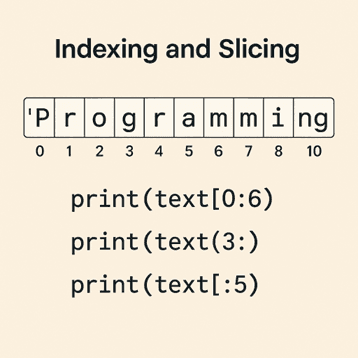
Slicing lets you extract parts of a string like cutting a cake.
Input:
text = "Programming"
print(text[0:6])
print(text[3:])
print(text[:5])
Output:
Progr
Gramming
Progr
Negative Indexing
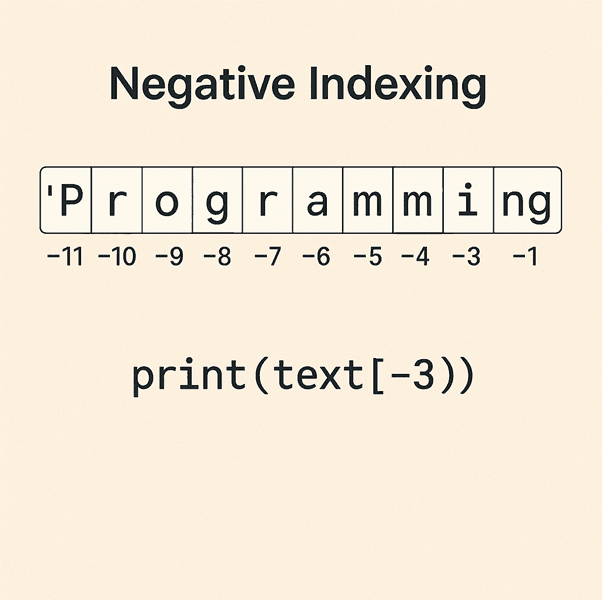
You can count from the end:
Input:
print(text[-3:])
Output:
ing
String Slicing Tricks
Input:
print(text[::-1])  # Output: gnimmargorP (reversed string)
Output:
Output:
gnimmargorP
String Operations and Methods
Concatenation and Repetition
You can combine or repeat strings:
Input:
greet = "Hello" + " " + "World!"
echo = "Hi! " * 3
Output:
HelloWorld!
Hi!Hi!Hi!
Common String Methods
| Method | Description | Example |
|---|---|---|
.upper() | Converts to uppercase | "hello".upper() → "HELLO" |
.lower() | Converts to lowercase | "PYTHON".lower() → "python" |
.replace() | Replaces text | "AI".replace("A", "I") → "II" |
.split() | Splits by spaces or separators | "a,b,c".split(",") → ['a', 'b', 'c'] |
.join() | Joins list items into a string | "-".join(['a', 'b', 'c']) → "a-b-c" |
When you want to insert variables into strings, Python gives you options.
String Formatting Techniques
1. f-Strings (Modern Way)
Input:
name = "Alice"
age = 25
print(f"My name is {name} and I'm {age} years old.")
Output:
My name is Alice and I'm 25 years old.
2. format() Method
Input:
print("My name is {} and I'm {} years old.".format("Alice", 25))
Output:
My name is Alice and I'm 25 years old.
3. Old-Style Formatting
Input:
print("My name is %s and I'm %d years old." % ("Alice", 25))
Output:
My name is Alice and I'm 25 years old.
Real-World Use Cases of Strings
Python strings quietly power countless applications every day:
Text Processing: Cleaning messy data, removing unwanted spaces, or extracting key information.
Data Cleaning: Removing punctuation or standardizing formats before analysis.
User Interfaces: Displaying messages, labels, or feedback in apps and websites.
APIs & Web Scraping: Handling JSON responses, URLs, and HTML text.
Chatbots: Recognizing and responding to user input.
Why Python Strings Rock… and Their Limits
Why They Rock
Beginner-Friendly: Easy to use and understand.
Powerful Built-ins: Dozens of ready-to-use string methods.
Flexible: Works seamlessly with data, files, and user inputs.
Where They Struggle
Immutable: You can’t directly modify strings — new copies are created.
Memory Usage: Handling very large strings can be costly.
Limited Speed: For high-performance text manipulation, specialized libraries like re (regex) or io may be better.
In short, Python strings are elegant and efficient for most tasks — just not the best for extreme-scale text processing.
The Magic Behind Text in Python (Conclusion)
From greeting users by name to powering AI chatbots, Python strings form the core of how computers communicate with humans.
By understanding strings — their types, creation, manipulation, and methods — you unlock a world of possibilities in text handling, automation, and data science.
The next time you see a program respond with a perfectly formatted message, remember: it all started with a few characters, a curious mind, and the magic of Python strings.
If you’re eager to dive deeper into Python and Data Science, AlmaBetter offers structured programs designed to equip you with job-ready coding skills. Their Professional Certification in Data Science and AI Engineering combines hands-on projects with personalized mentorship, ensuring you master everything from Python basics to AI applications.
Start your journey today and turn code into creativity!
Additional Readings:
If you’d like to explore more concepts related to strings in Python, here are some helpful resources from AlmaBetter:
Strings in Python – A Complete Guide
Learn everything about string creation, slicing, formatting, and manipulation in Python with examples and exercises.
Data Types in Python (With Examples)
Understand Python’s core data types, including strings, lists, tuples, and dictionaries — the building blocks of every Python program.
Python Literals – What Are Python Literals?
Dive deeper into string literals and learn how Python interprets text enclosed in quotes.
Regex in Python – Pattern Matching Made Easy
Take your string manipulation skills to the next level by learning how to extract, match, and validate patterns using regular expressions.
Python Cheat Sheet – From Beginner to Expert
A quick and handy reference to Python syntax, string operations, and built-in functions, perfect for revision and daily coding use.







 in Bengaluru, India


 in Bengaluru, India
