





Picture this: it’s 2 a.m., you’ve got an assignment due in a few hours, your notes are scattered, your brain is fuzzy, and your deadline is looming. You open your laptop and type in a prompt — and suddenly you’re interacting with an intelligent tool that summarises a chapter, generates a practice quiz on a tricky topic, refines your essay draft, and even suggests a visual aid for your presentation.
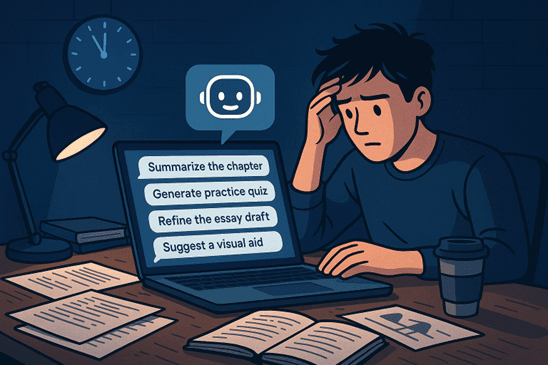
Welcome to student-life in 2026, where the right AI companion can feel like a midnight superhero. With ever-advancing generative models, smarter assistants and tailor-made study companions, students now have an unprecedented helping hand. But with so many tools out there, how do you pick the ones that actually accelerate learning, keep you organised, and don’t distract you?
This article will walk you through the most useful AI tools for students in 2026, how they can support studying, writing, research and creative work — and how to pick and use them ethically and effectively.
Summary
In this article, we begin by understanding what “AI tools for students” really means in the 2026 context: not just chatbots, but specialised assistants for study-planning, summarisation, presentation design, transcription, writing help, exam preparation, and visual/creative work. We then present a clear table of contents for easy navigation, followed by detailed sections for each major category of student-oriented AI tools — including their key features, ideal use-cases, and practical tips.
Several sections include comparison tables so you can weigh options (for example: writing assist vs summarisation tool). The article also shows how to integrate these tools into your study workflow (planning → drafting → revision → review) and highlights caution points (such as over-reliance, academic integrity, data privacy).
Finally, we wrap up with a conclusion that connects back to ongoing learning and offers a call-to-action to explore the relevant course by AlmaBetter. For further reading, we include links to related AlmaBetter articles. The goal: by the end, you should feel equipped with a practical toolkit of AI-powered student aids, know when and how to use them, and be mindful of common pitfalls.
Table of Contents
| Sr. No. | Section Title | Subsections / Tools Included |
|---|---|---|
| 1 | What Do “AI Tools for Students” Look Like in 2026? | — |
| 2 | Writing, Research & Academic Assistance Tools | I. Writing & Grammar Enhancement Tools: • Grammarly • Wordtune • Jasper AI • Notion AI II. AI Research Companions: • AI Scholar • Elicit • ResearchRabbit • Semantic Scholar AI III. Citation & Plagiarism Tools: • QuillBot • Turnitin AI • Scribbr • Ref-N-Write |
| 3 | Note-Taking, Summarisation & Productivity Platforms | I. Smart Note-Taking & Transcription Tools: • Otter AI • Notta II. Intelligent Knowledge Management: • Notion AI • Obsidian AI III. Powered Summarization Platforms: • Glasp • Upword |
| 4 | AI Tools for Creativity, Design & Presentation | I. AI-Powered Design Platforms: • Canva Magic Studio • Fotor AI • Adobe Firefly II. Presentation Creation & Visual Storytelling: • Tome • Beautiful AI III. Creative Media & Video Content: • Synthesia • Pika Labs • Runway ML |
| 5 | AI Tools for Task Management & Workflow Automation | I. Smart Scheduling & Time Management Tools: • Motion • Reclaim AI • Notion Calendar II. Workflow Automation Platforms: • Zapier • Make • n8n III. AI Personal Assistants & Habit Trackers: • Motion Assistant • Taskade AI • ClickUp Brain |
| 6 | AI Tools for Career Growth & Skill Development | I. AI-Powered Resume & Portfolio Builders: • Rezi AI • Kickresume • Canva Magic Resume II. AI Interview Preparation & Career Coaching: • Interview Warmup by Google • Huru & PrepAI • CoachGPT & Jobscan AI |
| 7 | Ethical Use, Academic Integrity & Best Practices | — |
| 8 | How to Integrate These Tools into Your Workflow | — |
| 9 | Conclusion | — |
| 10 | Additional Reading | — |
1. What Do “AI Tools for Students” Look Like in 2026?
In 2026, AI tools for students have evolved far beyond simple chatbots that answer questions. They’ve become intelligent companions that understand your academic needs, adapt to your learning style, and automate repetitive tasks — making studying faster, smarter, and more engaging.
Here’s what this new generation of tools looks like:
Generative & Interactive Assistants:
Think of AI companions like ChatGPT, Claude, or Gemini — but far more specialised. You can ask a question, receive a conversational and contextual response, refine it with follow-ups, and even get code snippets, essay outlines, or concept explanations. These tools now integrate directly with digital textbooks, lecture slides, and course materials, making them your 24/7 study partners.
Specialised Productivity Apps:
AI-powered note-taking and transcription apps now record lectures, identify key terms, and generate instant summaries and mind maps. Some even tag important timestamps so you can replay complex explanations later. Tools like these act as “digital secretaries” for your academic life — keeping your notes tidy and accessible.
Design & Creativity Support:
Not every student is a designer — and that’s where AI visual tools shine. They help you create stunning presentations, generate academic posters, turn your notes into infographics, and even make short explanatory videos. This visual boost helps communicate complex topics clearly and creatively — especially useful for project submissions or presentations.
Workflow Automation:
AI schedulers and task managers have become smarter. They can automatically plan your study calendar, break down large assignments into smaller tasks, generate personalised quizzes, and remind you when to revise. Some tools even analyse your productivity patterns to optimise learning sessions.
Because of breakthroughs in large language models, multimodal AI (text + image + audio + video), and seamless integrations with student platforms, the AI ecosystem in education is more dynamic than ever. Yet, with hundreds of tools competing for attention, the real skill lies in choosing the ones that fit your study style, subject demands, and personal workflow.
2. Writing, Research & Academic Assistance Tools
In 2026, the way students write, research, and present academic work has changed dramatically. With AI-driven writing companions and research assistants, the long, tiring process of drafting essays or creating reports has evolved into a smarter, faster, and more creative experience. These tools don’t just correct grammar mistakes — they enhance how students think, structure, and express their ideas.
I. Writing & Grammar Enhancement Tools:
Modern writing assistants like Grammarly, Wordtune, Jasper AI, and Notion AI have become essential study partners. They now go far beyond simple spell checks or grammar suggestions. Instead, they understand tone, intent, and context — helping students rewrite paragraphs for better clarity, adjust tone for formal or creative writing, and even enhance vocabulary based on academic requirements.
Grammarly: Precision Meets Professionalism
Grammarly has evolved into a full-fledged writing coach. Beyond fixing spelling and grammar, it now analyzes tone, intent, and audience. Its AI tone detector ensures your message sounds confident, formal, or friendly—whatever your context demands. It’s ideal for academic essays, internship emails, and project submissions that need to sound polished and professional.
Wordtune: Rewriting with Style and Clarity

Wordtune helps students express ideas more effectively by suggesting smarter sentence rewrites and alternative phrasing. It focuses on improving readability without changing the original meaning—perfect for students who want to make essays or research summaries sound natural yet sophisticated.
Jasper AI: The Creative Writing Powerhouse
Jasper AI goes beyond grammar—it’s designed for ideation and content generation. Students can use it to draft essays, project reports, or even social media posts with custom tones like persuasive, academic, or conversational. It’s especially useful when you’re stuck at the first draft stage or need a fresh, professional rewrite of your work.
Notion AI: Your Smart Study Companion
Integrated within the popular Notion workspace, Notion AI helps summarize notes, generate content ideas, and organize study material. Students can instantly turn rough notes into clean summaries or structured outlines. It’s a great tool for managing both creative and academic workflows in one place.
II. AI Research Companions:
Finding credible sources and summarising them efficiently used to be one of the toughest parts of academic work. That’s where AI research companions like ScholarAI, Elicit, ResearchRabbit, and Semantic Scholar AI come in. These platforms leverage massive academic databases to find relevant studies, summarise research findings, and even generate insights across multiple papers — saving hours of manual reading. Imagine typing a research question and instantly getting a short literature summary, related authors, and cited works — all within seconds.
ScholarAI: Your Gateway to Academic Knowledge

ScholarAI connects directly with vast academic databases, allowing students to search and summarise peer-reviewed papers within seconds. It simplifies literature reviews by providing key insights, citations, and even related authors—all without switching tabs or digging through endless PDFs.
Elicit: The Smart Research Synthesizer

Elicit uses AI to find, summarise, and compare academic papers based on a simple research question. What makes it powerful is its ability to identify gaps in research—helping students form sharper arguments, hypotheses, and literature overviews for essays or dissertations.
ResearchRabbit: Visualising Research Connections
ResearchRabbit transforms research exploration into an interactive, visual experience. It maps out networks of related authors, citations, and studies, helping students see how different ideas and scholars connect. It’s like Spotify for academic papers—suggesting what to “read next.”
Semantic Scholar AI: Insight Beyond Search
Semantic Scholar AI doesn’t just return search results—it interprets them. Using natural language understanding, it highlights the most influential papers, summarizes abstracts, and provides citation trends. This helps students cut through information overload and focus on what truly matters.
III. Citation & Plagiarism Tools:
Accuracy and originality remain the backbone of credible academic work, and that’s where citation and plagiarism-checking tools like QuillBot, Turnitin AI, Scribbr, and Ref-N-Write prove invaluable. They ensure your writing meets global academic standards by automating citation generation in multiple formats such as APA, MLA, and IEEE. Turnitin AI has advanced to detect not just copied text but also AI-generated sections, ensuring students maintain authentic work.
QuillBot: Paraphrasing Meets Citation Made Easy
QuillBot has evolved beyond its popular paraphrasing tool. Its built-in citation generator automatically creates references in APA, MLA, and other formats, while the paraphraser helps students rephrase sentences for better clarity and originality. It’s perfect for refining essays or reports while learning proper citation habits.
Turnitin AI: Ensuring Academic Integrity
Turnitin AI remains the gold standard for plagiarism detection. In 2026, it has advanced to identify not only copied content but also AI-generated sections, ensuring full transparency in academic submissions. It promotes originality and accountability, helping students submit ethically sound and authentic work.
Scribbr: The Student-Friendly Proofreader
Scribbr combines plagiarism checking, grammar correction, and citation tools into one student-focused platform. Its detailed feedback reports explain why text may be flagged, turning each scan into a learning opportunity. Scribbr’s AI helps students refine their papers while improving their long-term academic writing skills.
Ref-N-Write: The Research Writing Mentor

Ref-N-Write acts as a personal writing tutor for students. It not only helps generate accurate citations but also suggests academic phrases, synonyms, and structure improvements. Ideal for thesis or dissertation writing, it ensures tone consistency and academic professionalism throughout your work.
Why These Tools Matter:
Together, these AI platforms have redefined academic writing and research in 2026. They empower students to write with confidence, analyse more deeply, and produce original, high-quality work faster than ever before. Instead of struggling with structure, citations, or formatting, students can now channel their energy into critical thinking, creativity, and real learning.
Pro Tip: Use these tools as collaborators, not substitutes. Let AI handle the mechanics of writing — grammar, formatting, summarisation — while you bring in insight, interpretation, and personal voice. That’s how you turn AI assistance into genuine academic excellence.
3. Note-Taking, Summarisation & Productivity Platforms
In 2026, note-taking is no longer about scribbling in notebooks or manually typing out lecture points. AI-powered productivity platforms have revolutionised how students capture, organise, and retrieve information. From automatically transcribing lectures to generating concise summaries and connecting related ideas, these tools are now essential companions for students managing both academics and professional projects.
I. Smart Note-Taking & Transcription Tools:
Tools like Otter.ai and Notta have transformed classroom and meeting experiences. With just one click, they can record live lectures, online classes, or team discussions and instantly generate accurate transcripts. The AI identifies key terms, timestamps, and speaker labels, allowing students to revisit specific sections later — a lifesaver during exam revisions or project reviews.
Imagine attending a two-hour lecture and having a neatly summarised transcript with highlighted main points ready within minutes. Many platforms also integrate directly with Zoom, Google Meet, or Microsoft Teams, automatically attaching notes to recorded sessions for seamless accessibility.
Otter.ai: Your Real-Time Lecture Transcriber
Otter.ai is one of the most advanced AI transcription tools for students. It can record live lectures, online classes, or study group discussions and generate accurate transcripts in real time. Its standout features — speaker detection, keyword tagging, and searchable timestamps — make revisiting important concepts quick and effortless. Plus, its integration with platforms like Zoom and Google Meet ensures no important discussion is ever lost.
Notta: Instant Transcripts with Smart Summaries
Notta simplifies note-taking by instantly converting audio or video into clean, editable text. It also highlights key phrases and generates concise summaries, helping students focus on understanding rather than scribbling notes. With automatic syncing to tools like Microsoft Teams and Google Drive, Notta ensures that all your class notes and meeting records are accessible anytime, anywhere.
II. Intelligent Knowledge Management:
Beyond transcription, AI note systems like Notion AI and Obsidian take personal knowledge management to a new level. They help students convert unstructured notes into organised study resources. With features like AI-driven summarisation, context linking, and mind-map generation, these tools let students visualise concepts and connect related ideas effortlessly.
Notion AI: Smarter Notes, Sharper Thinking
Notion AI transforms ordinary note-taking into an intelligent learning experience. It can summarise lengthy lectures, create to-do lists, or even generate flashcards and quiz questions from your notes. Its AI assistant understands context, helping students reorganise their study material into clean, searchable formats — turning chaos into clarity.
Obsidian: Building Your Personal Knowledge Graph

Obsidian focuses on connections rather than just content. It allows students to link notes across topics and visualize them through dynamic “knowledge graphs.” This feature helps uncover relationships between ideas, perfect for research-heavy or interdisciplinary subjects. Combined with community plug-ins and AI-powered summarisation, Obsidian becomes a true second brain for serious learners.
III. AI-Powered Summarisation Platforms:
For students who consume a lot of digital content, tools like Glasp and Upword simplify online reading and research. They allow users to highlight key passages from web articles, PDFs, or academic papers and automatically create condensed summaries. Instead of manually writing summaries after hours of reading, these tools use NLP (Natural Language Processing) models to extract core insights instantly. This is especially helpful for learners who juggle coursework, internships, and self-paced online learning — turning information overload into organised understanding.
Glasp: Highlight, Summarise, and Learn Socially

Glasp acts as a browser extension that lets students highlight, save, and share key insights from web articles, PDFs, and YouTube transcripts. What makes it unique is its social layer — you can explore highlights and summaries from other learners, turning solo reading into a community-driven experience. It’s ideal for students who love curating and revisiting bite-sized knowledge.
Upword: Smart Summaries for Smarter Studying

Upword takes summarisation a step further by combining AI extraction with human-like readability. It automatically pulls main ideas from long documents and presents them as clear, structured summaries. Students can edit, rearrange, or annotate summaries — perfect for creating concise study notes or preparing for exams faster without losing key details.
Why These Tools Matter:
AI note-taking and summarisation platforms bring structure and focus to students’ lives. They act as a bridge between passive learning and active understanding — ensuring that no idea, concept, or lecture point ever gets lost. These tools don’t just store notes; they turn them into actionable knowledge. Whether you’re preparing for exams, managing group projects, or balancing academic and work responsibilities, having your notes centralised, searchable, and AI-organised ensures you stay productive without feeling overwhelmed.
Pro Tip: Combine AI tools strategically — use Otter.ai for capturing lectures, Notion AI for summarising and organising, and Glasp for highlighting online readings. This ecosystem ensures your learning workflow stays smooth, efficient, and stress-free.
4. AI Tools for Creativity, Design & Presentation
In 2026, creativity and design have become essential parts of student life — whether you’re preparing a project presentation, designing a poster, creating a portfolio, or explaining complex ideas visually. Thankfully, modern AI tools have made it possible for every student — regardless of design background — to create visually stunning and professional-quality content within minutes. These platforms bridge the gap between creativity and technology, helping students communicate their ideas more effectively and confidently.
I. AI-Powered Design Platforms:
Tools like Canva Magic Studio, Fotor AI, and Adobe Firefly have completely changed how students approach visual creation. With AI-driven templates, one-click background removers, and smart design suggestions, even non-designers can create sleek, professional layouts. Canva’s Magic Studio now allows users to describe what they want — such as “a modern infographic about AI trends in education” — and generates multiple ready-to-use designs instantly.
Adobe Firefly, on the other hand, uses generative AI to help students create original visuals, icons, and creative backgrounds tailored to specific themes. This saves hours of design time and lets students focus on message clarity rather than layout perfection.
Canva Magic Studio: Design Anything with a Prompt
Canva Magic Studio empowers students to create professional-quality visuals without design experience. By simply typing a description like “an infographic on AI trends in education”, students instantly get multiple ready-to-use designs. With AI-powered background removers, style matchers, and presentation generators, Canva turns complex design tasks into quick creative wins — ideal for projects, reports, and presentations.
Fotor AI: One-Click Creativity for Everyday Use
Fotor AI focuses on simplicity and speed. It offers AI-powered editing tools like background removal, image enhancement, and portrait touch-ups — perfect for students working on profile visuals, digital posters, or class projects. Its text-to-image generator can also bring abstract academic ideas to life visually, making it great for science, design, and marketing learners alike.
Adobe Firefly: Generative Art for Original Visuals
Adobe Firefly blends professional-grade creativity with AI ease. Students can generate unique icons, patterns, or backgrounds from simple text prompts, while maintaining brand or academic consistency. Its deep integration with Adobe tools like Photoshop and Illustrator helps students produce visually stunning work — whether for a research poster, a creative pitch, or a presentation deck.
II. Presentation Creation & Visual Storytelling:
When it comes to presentations, tools like Tome, Gamma, and Beautiful.ai have set new standards. Instead of starting with a blank slide deck, students can simply type a topic — for example, “impact of generative AI in higher education” — and the AI automatically generates a structured, well-designed presentation with talking points, images, and transitions. These platforms help students maintain narrative flow, design balance, and engagement — all without the steep learning curve of traditional design software. The result? Sleek, cohesive, and visually appealing presentations that make academic or professional communication effortless.
Tome: Presentations That Tell a Story
Tome is built around the idea of “story-first” presentations. Students can type a topic or paste their notes, and Tome instantly generates a structured presentation complete with visuals, transitions, and concise talking points. Its integration with text, images, and even video makes storytelling effortless — perfect for explaining complex academic ideas in a clear, engaging way.
Gamma: From Text Prompts to Stunning Decks
Gamma allows students to create sleek, interactive slide decks without design skills. Just describe your topic, and the AI crafts a professional presentation layout with cohesive flow and visual balance. It’s especially useful for case studies, project pitches, and classroom presentations where aesthetics and clarity both matter.
Beautiful.ai: Design Intelligence for Every Slide
Beautiful.ai combines automation with design logic to ensure every slide looks polished. It suggests layouts, aligns elements automatically, and adapts to your content in real time. Students can focus on crafting ideas instead of formatting slides, making it a go-to tool for fast, impactful, and visually consistent presentations.
III. AI Video Creation & Storytelling Tools
Beyond slides and infographics, AI has revolutionized how students create videos and visual narratives. Tools like Synthesia, Pika Labs, and Runway ML now enable learners to transform simple scripts or lecture notes into compelling explainer videos — complete with AI avatars, voiceovers, and animations.
Synthesia: AI Avatars Bring Learning to Life

Synthesia allows users to generate videos featuring lifelike AI presenters who narrate your content in multiple languages and tones. Students can convert text-based notes or essays into engaging video explainers — perfect for class presentations, e-learning content, or digital storytelling.
Pika Labs: Turn Imagination into Animation
Pika Labs focuses on creativity and motion. With just a text prompt or storyboard, it can generate animated clips that visualize ideas, concepts, or study topics. It’s ideal for illustrating data trends, scientific concepts, or short creative projects without any video-editing experience.
Runway ML: Advanced Editing with AI Magic

Runway ML combines video editing and generative AI, offering tools like background replacement, motion tracking, and style transfer. Students can use it to produce professional-quality videos or transform raw clips into polished, cinematic stories — all within minutes.
Why These Tools Matter:
AI creativity tools democratise design — they make high-quality, visually rich content accessible to everyone. They save time, boost engagement, and enhance how ideas are shared. In academic and professional contexts, visuals are powerful; a well-designed infographic or presentation can make a stronger impact than pages of text. For students juggling multiple assignments, projects, and side ventures, these tools bring a professional polish to their work without requiring deep technical expertise.
Pro Tip: Use these tools not just for beautifying work, but for clarifying complex ideas visually. Start your creative process with AI suggestions, but refine the final output with your own perspective — that’s how you balance efficiency with originality.
5. AI Tools for Task Management & Workflow Automation
In 2026, the line between academic work and personal productivity has blurred. Students are now managing multiple responsibilities at once — coursework, projects, internships, side hustles, and continuous learning. Keeping everything organised manually has become nearly impossible. This is where AI-powered task management and workflow automation tools step in, acting as intelligent assistants that plan, schedule, and optimize your entire study and work routine.
I. Smart Scheduling & Time Management Tools:
AI productivity platforms like Motion, Reclaim.ai, and Notion Calendar have redefined how students plan their days. These tools automatically prioritise tasks based on urgency, deadlines, and focus levels. For instance, Motion can analyse your calendar, detect your busiest hours, and auto-schedule deep work sessions for high-priority tasks. Similarly, Reclaim.ai integrates with Google Calendar to automatically find the best study or revision time — even adjusting dynamically when new tasks are added. These systems learn from your patterns, ensuring you maintain balance between academics, breaks, and personal time — a crucial element for mental well-being and sustained performance.
Motion: The Intelligent Task Scheduler

Motion uses AI to automatically plan your day with precision. It analyzes your to-do list, calendar events, and deadlines to create a dynamic schedule that prioritizes high-impact tasks first. For students, this means less time spent planning and more time executing — ideal during exams, project deadlines, or busy academic weeks.
Reclaim.ai: Smart Time Blocking for Balanced Routines
Reclaim.ai integrates seamlessly with Google Calendar to optimize your daily workflow. It automatically blocks time for study sessions, breaks, and meetings based on your availability and habits. The best part? It continuously adapts to new tasks, ensuring your schedule remains flexible yet productive — promoting both focus and mental balance.
Notion Calendar: Productivity Meets Personalisation
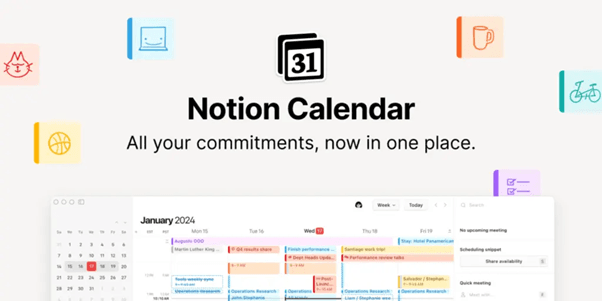
Notion Calendar brings time management and note organization under one roof. Students can connect assignments, goals, and class notes directly to their calendar events. Combined with Notion AI, it offers smart reminders, context-based scheduling, and even post-study reflections — transforming a simple planner into an intelligent productivity companion.
II. Workflow Automation Platforms:
Tools like Zapier, Make (formerly Integromat), and n8n help automate repetitive digital tasks that once consumed hours. A student can now create automations like “send my assignment reminders to Slack,” “save AI-generated notes to Google Drive,” or “auto-upload completed projects to Notion.” These integrations eliminate manual effort, keeping everything synced across apps. For example, an automated workflow might summarise your lecture recording using Otter.ai, upload it to Notion AI, and generate flashcards in Quizlet — all without a single click. By reducing routine effort, students can dedicate more time to creative thinking and problem-solving.
Zapier: The Automation Powerhouse
Zapier remains one of the most popular tools for connecting apps and automating tasks. With thousands of integrations, students can build simple “Zaps” like sending assignment reminders via Slack, backing up notes to Google Drive, or syncing deadlines with Notion. It’s perfect for students managing multiple tools — ensuring everything stays connected without constant manual updates.
Make (formerly Integromat): Visual Workflows for Complex Tasks

Make offers a more visual and advanced approach to automation. Students can design multi-step workflows that move data across apps in real time. For example, a lecture recording from Otter.ai can automatically trigger uploads to Notion, generate a summary in Docs, and notify a study group on Discord. It’s ideal for tech-savvy learners who want deeper control over their digital ecosystem.
n8n: Open-Source Automation with Flexibility
n8n gives students full freedom to create customized, privacy-friendly automations. Unlike closed platforms, it’s open-source — allowing learners to tailor workflows for specific study or research needs. It’s great for students in data science or computer science who want to experiment with integrations, APIs, and AI tools while keeping everything secure and under their control.
III. AI Personal Assistants & Habit Trackers:
Digital assistants have evolved beyond simple reminders. Tools like Motion Assistant, Taskade AI, and ClickUp Brain can now understand context, generate task lists, and even recommend when to rest or review material. ClickUp Brain, for instance, uses your study history to predict which topics you might forget soon and schedules a revision automatically. Some AI systems also integrate emotion and productivity tracking — analysing your writing tone or activity data to suggest when you might be mentally fatigued. These assistants adapt to your pace and style, offering a personalised workflow that keeps you consistent without burnout.
Motion Assistant: Context-Aware Daily Planner

Motion Assistant goes beyond setting simple reminders — it acts like a personal productivity strategist. It understands the context of your schedule, adjusts priorities in real time, and suggests when to focus or take breaks. For students juggling assignments, classes, and projects, Motion Assistant ensures every task fits smoothly into a balanced daily routine.
Taskade AI: Collaborative Study and Task Management
Taskade AI blends task management with real-time collaboration. Students can brainstorm ideas, generate to-do lists, or create structured study plans with a single command. The AI helps break large goals into actionable steps, making it easier to stay consistent and track progress — especially useful for team projects or group study sessions.
ClickUp Brain: Intelligent Learning Companion
ClickUp Brain takes personalization to the next level. It learns from your study patterns and predicts when you’re likely to forget certain topics, then schedules revision sessions automatically. It can even track productivity trends and mental fatigue based on your writing tone or activity data — helping you study smarter, not harder.
Why These Tools Matter:
Task management and automation are not just about productivity — they’re about peace of mind. AI helps students stay on top of responsibilities, avoid last-minute rushes, and maintain steady progress. In a fast-paced world where distractions are constant and multitasking is the norm, these intelligent tools act as silent partners — quietly handling scheduling, reminders, and digital organisation in the background. They make sure every minute you invest goes toward meaningful learning and growth, not repetitive logistics.
Pro Tip: Start with small automations — like syncing your to-do list with your calendar or auto-generating reminders for deadlines. Once you’re comfortable, scale up to full workflow systems that connect all your study, research, and creative tools together.
6. AI Tools for Career Growth & Skill Development (2026)
By 2026, AI has moved beyond classrooms and assignments — it’s now shaping how students build careers, develop professional skills, and stay future-ready. Whether you’re preparing for interviews, improving communication skills, or exploring new domains like data science or design, AI tools are becoming indispensable career companions. They not only accelerate learning but also personalise growth paths based on individual strengths and goals.
Let’s explore how AI is transforming the career journey — from building powerful resumes to mastering interviews and career planning.
I. AI-Powered Resume & Portfolio Builders:
Crafting a compelling resume or personal website has become effortless with tools like Rezi AI, Kickresume, and Canva Magic Resume. These platforms analyse job descriptions and automatically tailor your resume for each role — highlighting keywords, rephrasing bullet points, and improving visual appeal. Some even generate personalised cover letters or LinkedIn bios that reflect your achievements with professional tone consistency. For students entering the job market or applying for internships, such tools eliminate guesswork and boost confidence during applications.
Rezi AI: Resume Tailored for Every Role
Rezi AI goes beyond templates — it analyzes job descriptions, identifies relevant keywords, and automatically rewrites bullet points to match employer expectations. This keyword optimization helps students pass Applicant Tracking Systems (ATS) with ease.
Kickresume: Smarter Personal Branding
Kickresume combines AI writing assistance with beautiful design layouts. It can generate customized cover letters, rewrite sections in a professional tone, and even create a matching personal website — perfect for showcasing academic projects or portfolios.
Canva Magic Resume: Design Meets AI

Canva Magic Resume allows users to create visually appealing resumes in minutes. With AI-assisted formatting, font pairing, and layout recommendations, students can make resumes that are both professional and creative.
III. Interview Preparation & Career Coaching:
AI interview simulators like Interview Warmup by Google, Huru, and PrepAI have redefined how students prepare for real-world opportunities. These tools simulate domain-specific interviews, evaluate your answers using speech analysis, and provide instant feedback on clarity, confidence, and structure. They even suggest sample responses for tricky behavioural questions — a huge advantage in building communication skills. Combined with AI career coaches such as CoachGPT or Jobscan AI, students now receive guidance on career planning, skill prioritisation, and networking strategies. It’s like having a personal mentor available 24/7.
Interview Warmup by Google: Realistic Practice for Every Domain

This tool simulates domain-specific interviews and evaluates your answers on clarity, confidence, and structure. It even provides sample responses for tricky behavioral questions, allowing students to practice in a low-pressure environment while improving communication skills.
Huru & PrepAI: AI Feedback & Performance Insights

Huru and PrepAI analyze your responses in real-time, giving instant feedback on strengths, weak points, and areas for improvement. These platforms help students refine their answers, practice timing, and build confidence before actual interviews.
AI Career Coaches: Personalized Guidance with CoachGPT & Jobscan AI

Beyond practice, AI career coaches like CoachGPT and Jobscan AI provide career planning advice, suggest skill development priorities, and guide networking strategies. They act like a 24/7 personal mentor, helping students transition from academic learning to professional readiness efficiently.
Why These Tools Matter:
AI is no longer just about productivity — it’s about career empowerment. These platforms give students the competitive edge needed to thrive in a fast-changing job market. They help translate academic skills into employable strengths, guide learners through practical skill-building, and prepare them for real-world challenges. In a landscape where adaptability defines success, AI ensures students remain not just employable but exceptional.
Pro Tip: Use AI tools to complement human mentorship, not replace it. Combine AI-powered learning with real-world projects, internships, and networking — that’s where true professional growth happens.
7. Ethical Use, Academic Integrity & Best Practices
As AI tools become integral to the modern student experience, maintaining academic integrity and using these tools ethically has never been more important. While AI can summarize lectures, draft essays, and generate project ideas, it should never replace your own critical thinking or creativity. The key is to treat AI as a collaborator, not a substitute.
Always be transparent about when and how you’ve used AI in academic work—especially in assignments or research submissions. Cite sources properly if AI-assisted content contributes to your work. Avoid relying on AI to produce entire reports or analyses without review; instead, use it to clarify doubts, structure ideas, or improve clarity.
Responsible AI use isn’t just about following rules—it’s about developing professional integrity and learning how to balance automation with human insight. After all, the future workplace will reward those who can guide AI thoughtfully, not blindly depend on it.
8. How to Integrate These Tools into Your Workflow
AI tools can revolutionize your study habits if used strategically. Start small—integrate one or two tools into your daily workflow instead of overwhelming yourself with dozens. For example, use Notion AI or Otter.ai for organizing notes and transcribing lectures, while relying on ChatGPT or Perplexity for concept clarification and idea generation.
Develop a structured routine where AI supports your productivity without becoming a distraction. For instance, schedule 15 minutes with an AI planner to map your study day, use summarization tools after classes, and reserve weekends for experimenting with AI-powered design or presentation tools.
Consistency matters more than quantity—over time, you’ll naturally identify which tools align best with your learning style. The goal isn’t to automate learning, but to enhance it—turning AI into your smart assistant that boosts focus, creativity, and understanding across every subject.
9. Conclusion: The Future Belongs to AI-Savvy Students
As 2026 unfolds, one thing is certain — students who embrace AI will lead the way in academics, innovation, and professional growth. These tools are no longer futuristic luxuries; they are everyday companions that enhance productivity, spark creativity, and simplify learning. Whether it’s generating notes from lectures, organizing research, or visualizing complex ideas, AI is the silent co-pilot driving smarter study habits.
But remember, technology is only as powerful as the person using it. The key lies in mastering how to leverage AI — not just using it for shortcuts, but to amplify your understanding and efficiency.
If you’re ready to explore the limitless possibilities of AI and data-driven learning, check out AlmaBetter’s Data Science and AI programs — designed to transform you into a future-ready professional with hands-on AI experience and real-world projects.
Embrace AI. Empower your learning. Own your future.
10. Additional Reading: Explore More from AlmaBetter
If you enjoyed learning about AI tools for students in 2026, here are some insightful reads from AlmaBetter that can help you dive deeper into the world of AI, data science, and modern education:
Best AI Tools to Boost Productivity in 2025 — an overview of AI productivity tools.
12 Best AI Tools for Writing Content in 2025 — focused on writing and content creation.
Artificial Intelligence Tutorial 2025 – Learn AI for Free — a tutorial resource covering AI fundamentals.
Different Types of AI Projects — description of types of AI projects and how they apply.
Top 10 Most Popular Machine Learning Tools (2025 Edition) — examining ML tools useful for students/professionals.





 in Bengaluru, India



 in Bengaluru, India
