

Your Success, Our Mission!
6000+ Careers Transformed.
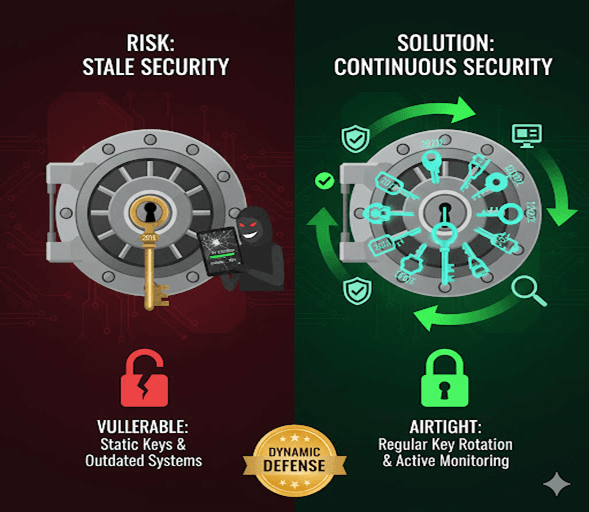
Imagine having the world’s strongest safe but using the same key for years — eventually, someone might copy or crack it.
In MongoDB, encryption keys and software configurations behave the same way.
Without regular key rotation, timely updates, and active monitoring, even the strongest encryption can become vulnerable over time.
This lesson focuses on how to keep your MongoDB security airtight — not just once, but continuously.
Here’s a conceptual image that illustrates the idea of a very strong safe (encryption) becoming vulnerable over time if the key isn't changed or if the security isn't actively maintained.
By the end of this lesson, you’ll be able to:
Understand why key rotation is essential for data longevity and safety
Learn how to rotate encryption keys securely in MongoDB
Set up automated updates and vulnerability patches
Implement monitoring strategies to detect suspicious activity early
Example: Rotating Master Keys in MongoDB (Linux)
# Step 1: Stop MongoDB service sudo systemctl stop mongod # Step 2: Rotate the master key (using new key file) openssl rand -base64 96 > new-keyfile sudo mv new-keyfile /etc/mongokeys/ sudo chown mongod:mongod /etc/mongokeys/new-keyfile sudo chmod 600 /etc/mongokeys/new-keyfile # Step 3: Update mongod.conf sudo nano /etc/mongod.conf # Change the keyFile path to point to new-keyfile # Step 4: Restart MongoDB sudo systemctl start mongod
This ensures all encrypted data is now protected using a fresh key.
MongoDB integrates with MongoDB Cloud Manager or Prometheus/Grafana to visualize and monitor performance + security metrics.
Sample Prometheus Metric Setup
mongodb_exporter: enabled: true uri: "mongodb://admin:password@localhost:27017" collect.collection: true collect.database: true collect.topmetrics: true
Monitored Parameters
Authentication failures
Unusual read/write activity
Unencrypted connections
Lag in replica sets
| Best Practice | Description |
|---|---|
| Use Strong Passwords | Avoid weak credentials |
| Regular Key Rotation | Change encryption keys frequently |
| Disable Unused Interfaces | Close open network ports |
| Keep MongoDB Updated | Apply latest patches |
| Use Atlas Security Tools | Built-in encryption and IAM integration |
Throughout this tutorial series, we’ve explored MongoDB’s powerful security framework — from foundational access controls to advanced encryption strategies that protect data at every layer.
Let’s recap what you’ve mastered:
Authentication & Authorization – Controlling who can access your data and what they can do.
Encryption at Rest – Protecting stored data, ensuring it remains unreadable without the right keys.
Encryption in Transit – Safeguarding data as it travels across networks using TLS/SSL.
Field-Level Encryption (Client-Side) – Encrypting sensitive fields right from your application, achieving true zero-trust security.
Key Rotation, Updates, and Monitoring – Maintaining long-term data integrity through continuous protection, regular updates, and real-time oversight.
MongoDB’s layered security model isn’t just about technology — it’s about trust, compliance, and resilience.
Each mechanism, when implemented together, forms a comprehensive defense that ensures your data is:
Confidential (only authorized users can read it)
Integral (no unauthorized modifications)
Available (protected against corruption or loss)
As you continue building real-world applications, remember:
Security isn’t a one-time setup — it's a living process that evolves with your system.
By applying these best practices, you’re not only securing data — you’re protecting user confidence, organizational reputation, and long-term reliability.
Top Tutorials

Python
Python is a popular and versatile programming language used for a wide variety of tasks, including web development, data analysis, artificial intelligence, and more.
SQL
The SQL for Beginners Tutorial is a concise and easy-to-follow guide designed for individuals new to Structured Query Language (SQL). It covers the fundamentals of SQL, a powerful programming language used for managing relational databases. The tutorial introduces key concepts such as creating, retrieving, updating, and deleting data in a database using SQL queries.

Data Science
Learn Data Science for free with our data science tutorial. Explore essential skills, tools, and techniques to master Data Science and kickstart your career

 in Bengaluru, India


All Courses (6)
Master's Degree (2)
Fellowship (2)
Certifications (2)


 Why Continuous Security Maintenance Matters



 in Bengaluru, India
