







1. JavaScript Spread Operator – Foundations
1.1 Understanding the Syntax of the Spread Operator
1.1.1 How the Spread Syntax Works Internally
Explanation
The spread operator (...) extracts individual values from an iterable or properties from an object.
For arrays and strings, elements are read sequentially using the iterator mechanism.
For objects, only own enumerable properties are copied.
The operation always produces a shallow copy.
Nested references remain shared between the original and the copied structure.
Code / Tabular Examples
const arr = [1, 2, 3]; const newArr = [...arr, 4]; const obj = { a: 1, b: 2 }; const newObj = { ...obj, c: 3 };
Structure Overview
| Structure | Result After Spread |
|---|---|
| Array | Elements expanded |
| Object | Properties copied |
| Copy type | Shallow |
Example
When an array is expanded using spread, a new array reference is created.
The original array remains unchanged throughout the operation.
Any added elements affect only the new array.
This behavior helps prevent unintended mutations.
It is especially useful in shared-data scenarios.
Use Cases
Copying arrays without mutation
Extending objects safely
Creating new data structures
Preventing side effects
1.2 Comparison with Traditional JavaScript Methods
1.2.1 Spread Operator vs concat(), Object.assign(), apply()
Explanation
Before ES6, developers used concat(), Object.assign(), and apply() for similar tasks.
These methods require more verbose syntax and reduce clarity.
The spread operator provides a unified and readable alternative.
It integrates directly into literals and function calls.
The behavior remains shallow, but the syntax is significantly cleaner.
Code / Tabular Examples
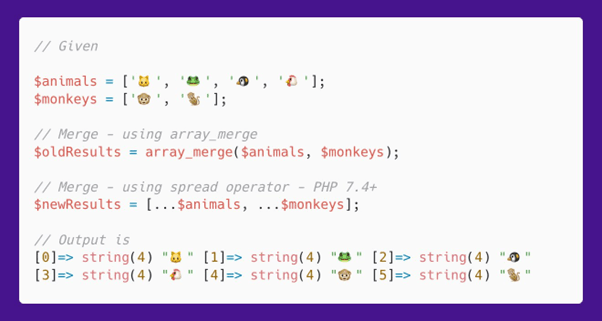
// Traditional const arr = arr1.concat(arr2); const obj = Object.assign({}, obj1, obj2); Math.max.apply(null, nums); // Spread const arrNew = [...arr1, ...arr2]; const objNew = { ...obj1, ...obj2 }; Math.max(...nums);
Comparison Table
| Operation | Traditional | Spread |
|---|---|---|
| Array merge | concat() | [...a, ...b] |
| Object merge | Object.assign() | { ...a, ...b } |
| Function call | apply() | ...args |
Example
Traditional methods often require extra boilerplate code.
Spread syntax reduces this to a single readable expression.
Function calls become clearer without handling context.
Object merging avoids explicit target definitions.
Overall code readability improves significantly.
Use Cases
Refactoring legacy JavaScript
Writing cleaner ES6 code
Simplifying function calls
Reducing boilerplate logic
2. Spread Operator with Arrays
2.1 Creating and Copying Arrays
2.1.1 Shallow Copying and Reference Behavior
Explanation
The spread operator creates a new array by expanding elements of an existing array.
This new array has a different reference in memory.
Primitive values are copied independently, so changes do not affect the original array.
Nested objects or arrays remain shared by reference.
The original array is never mutated during this process.
Code / Tabular Examples
const original = [1, 2, 3]; const copy = [...original]; copy.push(4);
Result Table
| Array Name | Values |
|---|---|
| original | [1, 2, 3] |
| copy | [1, 2, 3, 4] |
Example
Direct assignment of arrays shares the same reference.
Using spread creates a new independent array.
Changes made to the copied array do not affect the original.
This prevents unexpected side effects in programs.
It is widely used in immutable programming patterns.
Use Cases
Safely duplicating arrays
Avoiding reference-based bugs
Preserving original datasets
Working with immutable state
2.2 Merging and Expanding Arrays
2.2.1 Combining Multiple Arrays Safely
Explanation
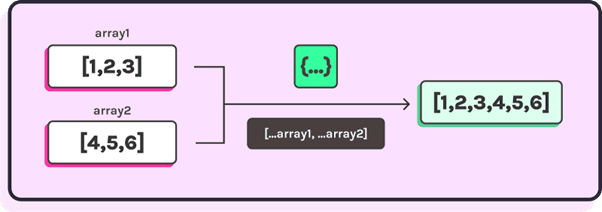
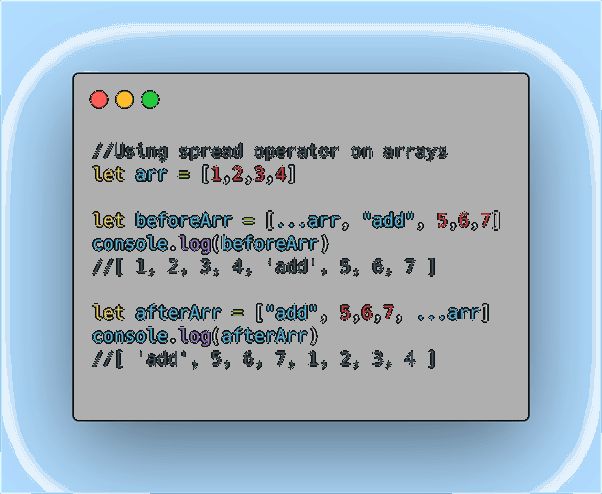
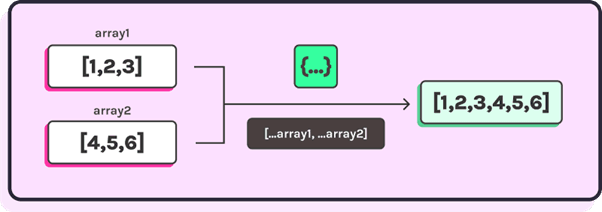
The spread operator allows multiple arrays to be merged into a single array.
Each array is expanded in sequence inside a new array literal.
No source array is modified during the merge.
Additional elements can be inserted at any position.
The result is a clean and predictable combined array.
Code / Tabular Examples
const a = [1, 2]; const b = [3, 4]; const merged = [...a, ...b, 5];
Result Table
| Source | Values |
|---|---|
| a | [1, 2] |
| b | [3, 4] |
| merged | [1, 2, 3, 4, 5] |
Example
Traditional merging often requires chained method calls.
Spread merges arrays in a single readable expression.
The order of elements is preserved exactly.
Extra values can be added during merging.
This improves clarity and reduces code complexity.
Use Cases
Combining data from different sources
Appending elements while merging
Building option or configuration lists
Simplifying array construction
3. Spread Operator with Objects
3.1 Cloning JavaScript Objects
3.1.1 Shallow Copying and Property Reference Behavior
Explanation
The spread operator creates a new object by copying properties from an existing object.
Only own enumerable properties are included in the copy.
Primitive property values are copied independently.
Nested objects continue to share references with the original.
The original object remains unchanged throughout the operation.
Code / Tabular Examples
const user = { name: "Ali", age: 21 }; const userCopy = { ...user }; userCopy.age = 22;
Result Table
| Object | name | age |
|---|---|---|
| user | Ali | 21 |
| userCopy | Ali | 22 |
Example
Assigning objects directly causes reference sharing.
Using spread prevents this by creating a new object.
Changes to the copied object stay isolated.
This reduces unintended data mutation.
It improves reliability in complex applications.
Use Cases
Creating immutable object copies
Protecting shared data
Managing application state
Reusing object templates
3.2 Merging Objects and Overriding Properties
3.2.1 Property Precedence and Conflict Resolution
Explanation
Multiple objects can be merged using the spread operator inside an object literal.
Properties from later objects overwrite earlier ones when keys conflict.
This precedence is determined by the order of spreading.
No source object is modified during merging.
The result is a consolidated object with predictable values.
Code / Tabular Examples
const defaults = { theme: "light", layout: "grid" }; const userSettings = { theme: "dark" }; const settings = { ...defaults, ...userSettings };
Result Table
| Property | Final Value |
|---|---|
| theme | dark |
| layout | grid |
Example
Configuration objects often need controlled overrides.
Spread allows defaults to be applied first.
User-defined values can then replace them.
The order of spreading makes precedence clear.
This approach simplifies configuration management.
Use Cases
Merging configuration objects
Overriding default values
Combining API response data
Building flexible data models
4. Spread Operator in Function Calls
4.1 Passing Arguments Dynamically
4.1.1 Expanding Arrays into Function Parameters
Explanation
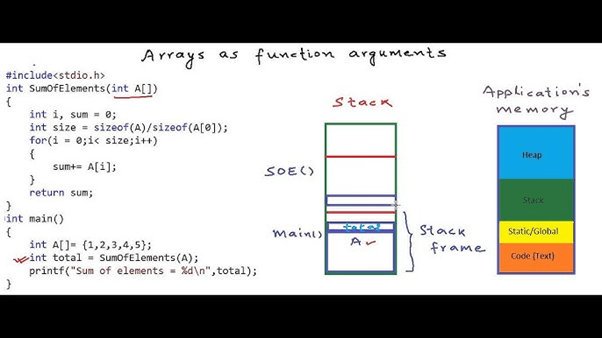
The spread operator allows array elements to be passed as individual arguments to a function.
Each element is expanded in order and mapped to the function’s parameters.
This removes the need to manually access array indices.
It improves readability when dealing with dynamic argument lists.
The original array remains unchanged during the function call.
Code / Tabular Examples
function sum(a, b, c) { return a + b + c; } const values = [10, 20, 30]; const result = sum(...values);
Result Table
| Parameter | Value |
|---|---|
| a | 10 |
| b | 20 |
| c | 30 |
Example
Functions often expect separate parameters.
Data is frequently available as an array.
Spread bridges this mismatch cleanly.
It avoids repetitive parameter mapping code.
The function call remains concise and clear.
Use Cases
Passing dynamic input to functions
Mathematical and utility operations
Working with API argument lists
Improving function call readability
4.2 Spread Operator vs Rest Parameters
4.2.1 Difference in Purpose and Usage
Explanation
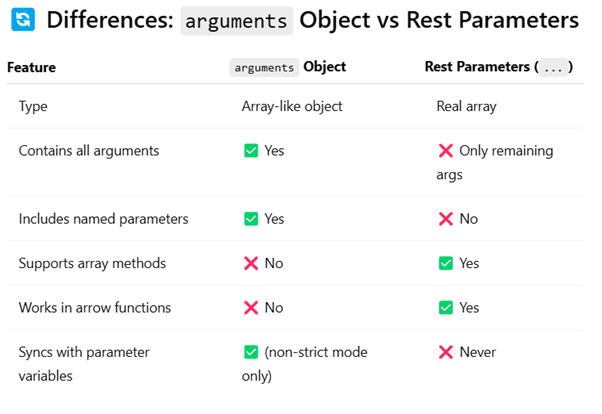
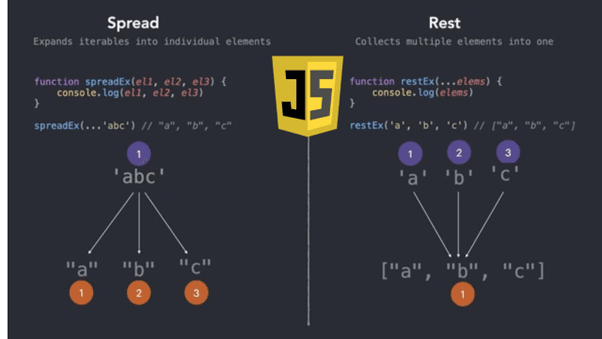
Spread and rest use the same syntax but serve opposite roles.
Spread expands values when calling a function or creating literals.
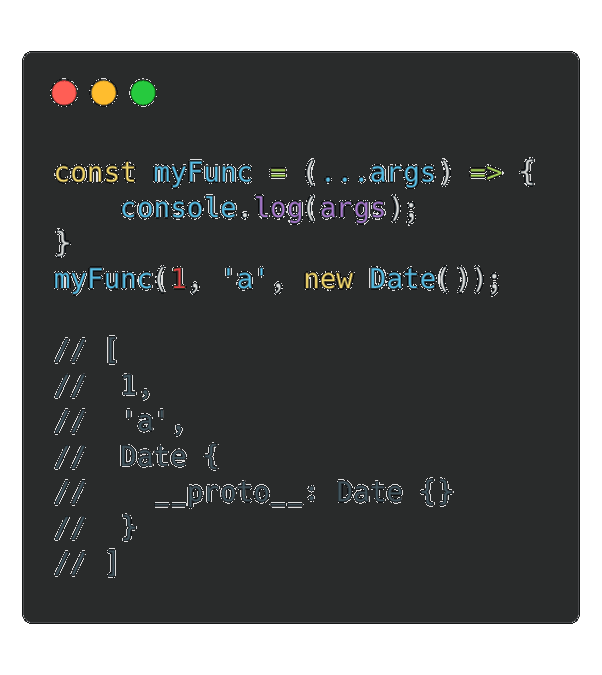
Rest collects multiple values into a single array in function definitions.
Spread is used at the call site, while rest is used in parameters.
Understanding the distinction prevents incorrect usage.
Code / Tabular Examples
// Rest parameter function total(...nums) { return nums.reduce((a, b) => a + b, 0); } const numbers = [1, 2, 3]; total(...numbers);
Comparison Table
| Feature | Spread | Rest |
|---|---|---|
| Purpose | Expands values | Collects values |
| Location | Function call | Function definition |
| Result | Individual elements | Array |
Example
Spread sends multiple values into a function.
Rest gathers multiple arguments inside a function.
Mixing them up leads to logic errors.
Used correctly, they complement each other well.
Together, they enable flexible function design.
Use Cases
Handling variable-length arguments
Designing reusable utility functions
Writing clean function signatures
Avoiding argument-handling bugs
5. Spread Operator with Strings and Iterables
5.1 Expanding Strings into Individual Characters
5.1.1 Character-Level Expansion and Unicode Safety
Explanation
Strings in JavaScript are iterable, which allows the spread operator to expand them into individual characters.
Each character becomes a separate element in the resulting array.
This approach handles Unicode characters more reliably than older string methods.
The original string remains unchanged.
The result is a clean character-level representation.
Code / Tabular Examples
const text = "Hello"; const chars = [...text];
Result Table
| Index | Character |
|---|---|
| 0 | H |
| 1 | e |
| 2 | l |
| 3 | l |
| 4 | o |
Example
Breaking a string into characters is a common task.
Spread avoids manual looping or complex logic.
It provides a direct and readable solution.
Unicode characters are handled correctly.
This improves reliability in text processing.
Use Cases
Character-by-character string processing
Input validation and formatting
Text analysis operations
Unicode-safe transformations
5.2 Working with Sets and Other Iterables
5.2.1 Converting Iterables into Arrays
Explanation
The spread operator works with all iterable objects such as Sets and Maps.
When applied, it extracts each value into a new array.
This is commonly used to remove duplicate values using Sets.
The conversion is concise and readable.
The original iterable remains unchanged.
Code / Tabular Examples
const uniqueSet = new Set([1, 2, 2, 3]); const uniqueArray = [...uniqueSet];
Result Table
| Structure | Result |
|---|---|
| Set | [1, 2, 3] |
| Array | Unique values |
Example
Removing duplicates traditionally requires filtering logic.
Using Set with spread achieves this in one step.
The code becomes shorter and easier to read.
This approach works consistently for iterables.
It is widely adopted in modern JavaScript.
Use Cases
Removing duplicate elements
Converting Sets or Maps to arrays
Normalizing iterable data
Simplifying data transformations
6. Spread Operator in Modern JavaScript Frameworks
6.1 Usage in React State and Props
6.1.1 Immutable State Updates Using Spread
Explanation
Modern frameworks like React rely on immutability for efficient state updates.
The spread operator helps create new state objects or arrays instead of mutating existing ones.
This ensures React can correctly detect changes and re-render components.
Only the required fields are updated while others remain unchanged.
The original state object is never modified.
Code / Tabular Examples
const [user, setUser] = useState({ name: "Ali", age: 21 }); setUser({ ...user, age: 22 });
State Change Table
| State Property | Before | After |
|---|---|---|
| name | Ali | Ali |
| age | 21 | 22 |
Example
Direct state mutation can cause rendering issues.
Spread ensures a new object reference is created.
React detects the update reliably.
State changes remain predictable and isolated.
This pattern is standard in React development.
Use Cases
Updating React component state
Handling form input changes
Managing props immutably
Preventing rendering bugs
6.2 Usage in Node.js and Backend Code
6.2.1 Configuration and Data Manipulation Patterns
Explanation
In backend environments, the spread operator is commonly used to merge configuration objects.
Default settings can be combined with environment-specific overrides cleanly.
Spread avoids mutating shared configuration references.
The order of properties determines precedence clearly.
This leads to predictable and maintainable backend logic.
Code / Tabular Examples
const defaultConfig = { port: 3000, debug: false }; const envConfig = { debug: true }; const finalConfig = { ...defaultConfig, ...envConfig };
Result Table
| Configuration | Value |
|---|---|
| port | 3000 |
| debug | true |
Example
Backend systems often load settings from multiple sources.
Spread combines them without altering defaults.
Overrides are applied in a controlled manner.
The final configuration is easy to reason about.
This improves reliability across environments.
Use Cases
Merging server configurations
Handling API request payloads
Normalizing backend data
Writing clean server-side logic
7. Performance and Memory Considerations
7.1 Cost of Shallow Copies
7.1.1 Performance Impact on Large Data Structures
Explanation
The spread operator creates a new array or object each time it is used.
For large datasets, this copying process consumes additional memory.
Execution time increases as data size grows.
Nested references remain shared, which can still cause side effects.
Careful usage is required in performance-critical sections.
Code / Tabular Examples
const largeArray = new Array(1000000).fill(0); const copiedArray = [...largeArray];
Performance Impact Table
| Data Size | Memory Impact |
|---|---|
| Small | Minimal |
| Medium | Moderate |
| Large | High |
Example
Using spread on small arrays is usually safe.
For very large arrays, repeated copying becomes expensive.
Memory usage can increase quickly.
This may affect application responsiveness.
Performance testing is recommended in such cases.
Use Cases
Evaluating memory trade-offs
Optimizing data-heavy operations
Avoiding unnecessary copies
Designing efficient workflows
7.2 Best Practices for Optimization
7.2.1 When Not to Use the Spread Operator
Explanation
The spread operator should be avoided when deep cloning is required.
It is also inefficient inside loops that repeatedly rebuild arrays.
In such cases, direct mutation or specialized cloning methods may perform better.
Spread is best used where immutability improves clarity.
Choosing the right tool ensures balanced performance.
Code / Tabular Examples
// Inefficient pattern for (let i = 0; i < data.length; i++) { result = [...result, data[i]]; }
Optimization Table
| Scenario | Better Approach |
|---|---|
| Deep copy | Structured cloning |
| Large loops | push() |
| Small updates | Spread |
Example
Using spread inside loops causes repeated memory allocation.
This slows down execution significantly.
Appending values directly is more efficient.
Spread should be reserved for controlled updates.
Balanced usage leads to better performance.
Use Cases
Writing performance-aware code
Avoiding memory overhead
Choosing efficient data structures
Improving application scalability
8. Common Mistakes and Edge Cases
8.1 Spread Operator Pitfalls
8.1.1 Unexpected Mutations and Logical Errors
Explanation
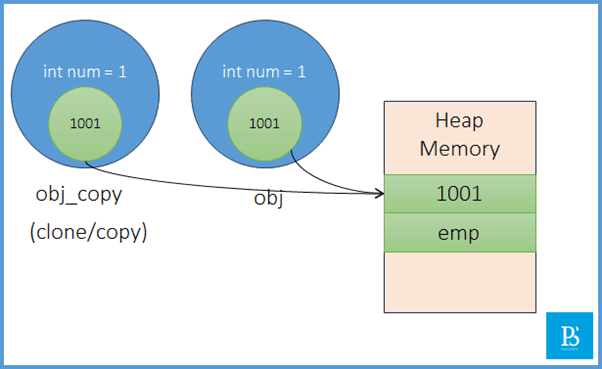
A common misunderstanding is assuming the spread operator performs deep copying.
In reality, it only creates a shallow copy.
Nested objects and arrays still share references.
Modifying nested values can unintentionally affect the original data.
This often leads to subtle and hard-to-debug issues.
Code / Tabular Examples
const data = { profile: { name: "Ali" } }; const copied = { ...data }; copied.profile.name = "Ahmed";
Result Table
| Object | profile.name |
|---|---|
| data | Ahmed |
| copied | Ahmed |
Example
At first glance, spreading appears to protect the original object.
However, nested references remain shared.
Changing a nested value affects both objects.
This can break application logic unexpectedly.
Understanding this behavior is critical for correctness.
Use Cases
Identifying shallow copy limitations
Debugging mutation-related bugs
Choosing deep copy alternatives
Handling nested data safely
8.2 Debugging and Safe Usage Patterns
8.2.1 Writing Predictable and Maintainable Code
Explanation
Safe usage of the spread operator requires awareness of data structure depth.
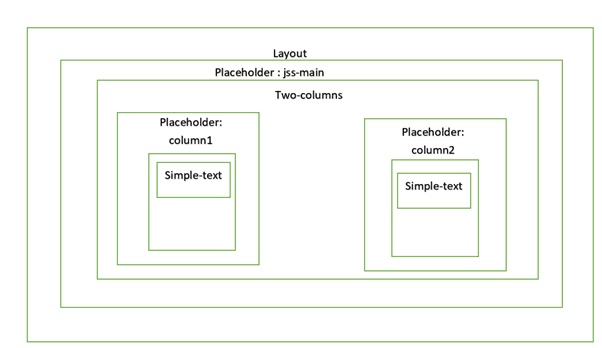
Nested objects should be copied explicitly when isolation is required.
Logging and debugging tools help detect shared references.
Combining spread with controlled cloning improves reliability.
Clear patterns lead to maintainable codebases.
Code / Tabular Examples
const safeCopy = { ...data, profile: { ...data.profile } };
Technique Table
| Technique | Benefit |
|---|---|
| Nested spread | Avoid shared references |
| Logging | Detect mutations |
| Cloning utilities | Ensure isolation |
Example
Explicitly spreading nested objects prevents reference leakage.
Each object becomes independently modifiable.
This avoids hidden side effects.
Code behavior becomes predictable.
Maintenance becomes significantly easier.
Use Cases
Managing complex application state
Avoiding unintended data mutations
Writing robust business logic
Improving long-term maintainability
Conclusion
The spread operator has become an essential part of the JavaScript ecosystem because it directly addresses one of the language’s long-standing challenges: safe and readable data manipulation.
By enabling developers to work with copies rather than references, it reduces unintended side effects and improves debugging efficiency.
While it is not a replacement for deep cloning techniques, it handles the majority of everyday data manipulation needs effectively.
Proper understanding of its behavior, especially its shallow copy limitation, allows developers to use it confidently and correctly.
Mastery of the spread operator is a strong indicator of modern JavaScript proficiency.
Additional Readings
ECMAScript 2015 (ES6) Official Language Specification
MDN Web Docs – Spread Syntax Reference and Examples
JavaScript.info – Data Types and Advanced Functions
React Official Documentation – State and Immutability
Node.js Documentation – Best Practices for Configuration Handling
AlmaBetter Links for Reference
AlmaBetter JavaScript Spread Operator Resources
While AlmaBetter covers the spread operator within broader JavaScript tutorials, these are the most relevant links:
Resource Table
| Resource Type | Title | Key Topics Covered |
|---|---|---|
| Tutorial | JavaScript Operators - AlmaBetter | A detailed breakdown of different operator types, including the Spread Operator (...) used for expanding iterables. |
| Tutorial | Functions in JavaScript - AlmaBetter | Covers how to use the spread operator to pass a variable number of arguments to functions efficiently. |
| Article | JavaScript Pass by Reference or Value - AlmaBetter | Explains how objects and arrays are handled. This is essential for understanding why we use the spread operator to create shallow copies of data. |
Core Concepts of the Spread Operator
The spread operator is a powerful tool in ES6+ that "unpacks" elements from an iterable (like an array or object).
Copying Arrays: const newArr = [...oldArr];
Merging Objects: const combined = { ...obj1, ...obj2 };
Function Calls: Math.max(...numberArray);
Difference Between Spread and Rest
It is common to confuse the Spread Operator with Rest Parameters because they both use the ... syntax.
Spread: Expands an array into individual elements (e.g., in a function call).
Rest: Collects multiple individual elements into a single array (e.g., in a function definition).
For a visual walkthrough of these examples, you might find this Spread Operator tutorial helpful.
This video is relevant because it provides a beginner-friendly practical demonstration of cloning and merging arrays and objects, which complements the technical articles from AlmaBetter.







 in Bengaluru, India


 in Bengaluru, India