








Introduction
In the early stages of many software projects, teams are often under pressure to deliver features quickly. Deadlines are tight, requirements seem clear, and writing code feels like real progress. In this rush, system design is frequently treated as an optional step—something that can be “figured out later.” Initially, the software works, users are satisfied, and the product moves forward. However, as usage grows, new features are added, and multiple developers begin working on the same codebase, cracks start to appear. Performance degrades, small changes break unrelated components, deployments become risky, and scaling the system feels increasingly complex.
At this point, teams realize that the real challenge is no longer writing code but managing complexity. The absence of a well-thought-out system design makes the software fragile, expensive to maintain, and difficult to evolve. Conversely, projects that invested time in system design early on tend to handle growth gracefully. They scale better, adapt faster to change, and remain understandable even as they grow large. This contrast highlights a critical truth in software engineering: system design is not an overhead—it is the foundation upon which sustainable, high-quality software is built.
Importance of System Design in Software Development
Role of System Design in Modern Software Engineering
System Design as a Foundation for Software Quality
Explanation
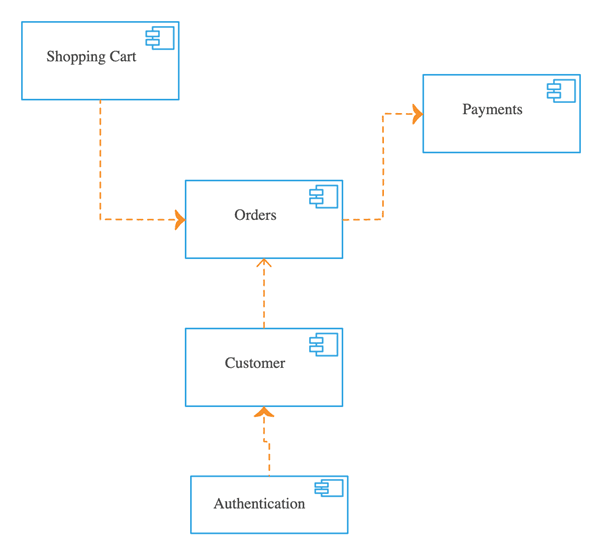
System design establishes the structural backbone of a software system, directly influencing its overall quality and reliability. By defining clear architectural boundaries, it ensures that components interact in predictable and controlled ways. This reduces unintended side effects when changes are introduced, improving system stability over time. A well-designed system makes quality attributes such as scalability, performance, and security inherent rather than reactive. It also promotes consistency across the codebase, which simplifies debugging and testing activities. As a result, software quality becomes a built-in characteristic rather than a post-development correction.
Tabular Example
| Quality Attribute | Design Practice | Quality Outcome |
|---|---|---|
| Maintainability | Modular components | Easier updates |
| Reliability | Redundancy planning | Fewer failures |
| Performance | Optimized data flow | Faster responses |
| Scalability | Stateless services | Smooth scaling |
Example
Consider a payroll management system designed with independent modules for employee data, salary calculation, and reporting. When tax rules change, only the calculation module needs modification without affecting other parts of the system. Testing becomes easier because each module can be verified independently. New developers can quickly understand the system structure due to clear separation. Performance tuning can be applied to critical modules without global changes. Over time, the system maintains high quality despite continuous updates.
Use Cases
- Banking and financial software systems
- Enterprise resource planning platforms
- Healthcare information systems
- Large-scale SaaS applications
Impact of System Design on Development Lifecycle
Influence of Early Design Decisions on Long-Term Outcomes
Explanation
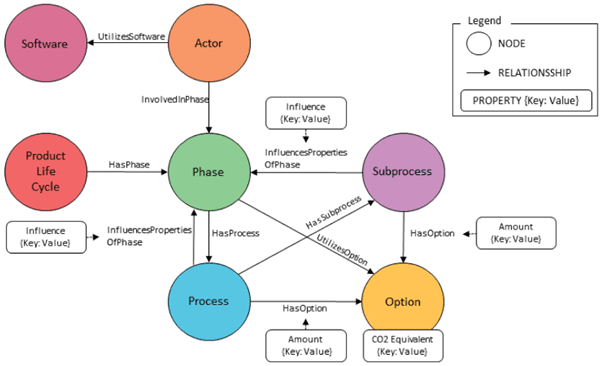
Early system design decisions create architectural constraints that shape the entire future of the software. Choices related to architecture style, data storage, and integration patterns determine how easily the system can grow and adapt. Poor early decisions often lead to rigid systems that are expensive to modify and scale. Well-considered design choices enable smoother development, testing, and deployment phases throughout the lifecycle. They reduce technical debt by preventing shortcuts that cause long-term issues. Ultimately, early design decisions define whether a system remains sustainable or becomes a liability over time.
Code / Tabular Example
| Design Choice | Initial Effect | Long-Term Impact |
|---|---|---|
| Modular design | Higher planning effort | Easier evolution |
| Tight coupling | Faster early coding | High maintenance cost |
| Scalable database | Complex setup | Future-ready growth |
| Clear APIs | Defined boundaries | Independent development |
Example
A product team selects a loosely coupled architecture at the start of development. Initially, implementation takes longer due to careful interface definition. As the product grows, teams can work in parallel without conflicts. New features are introduced without breaking existing functionality. Scaling the system for higher user loads requires minimal restructuring. Over several years, the system remains flexible and cost-efficient to maintain.
Use Cases
-
Startups planning long-term product growth
-
Enterprise applications with evolving requirements
-
Systems expected to handle increasing user traffic
-
Software with frequent technology upgrades
Core Principles of Effective System Design
Scalability and Performance Considerations
Designing Systems for Horizontal and Vertical Scalability
Explanation
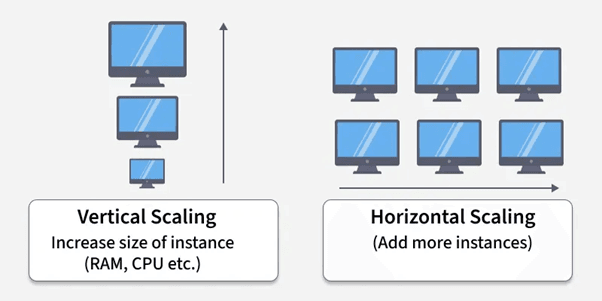
Scalability-focused system design ensures that software can handle increasing workloads without compromising performance. Horizontal scalability allows systems to distribute load across multiple machines, improving fault tolerance and availability. Vertical scalability enhances capacity by upgrading existing hardware resources, offering simplicity for smaller systems. Effective design evaluates both approaches early to avoid bottlenecks as usage grows. It also incorporates load balancing and stateless components to support dynamic scaling. By planning scalability in advance, systems remain responsive even under peak demand conditions.
Code / Tabular Example
| Scalability Type | Design Approach | Practical Benefit |
|---|---|---|
| Horizontal | Service replication | High availability |
| Vertical | Resource upgrades | Quick capacity boost |
| Stateless design | Session externalization | Easy scaling |
| Load balancing | Traffic distribution | Improved performance |
Example
An online learning platform experiences rapid growth in user registrations. The system is designed to add application servers dynamically as traffic increases. Load balancers distribute incoming requests evenly across servers. Databases are optimized to handle read-heavy operations efficiently. Performance remains stable during peak hours such as examinations. This scalable design allows uninterrupted service as the platform expands globally.
Use Cases
- E-commerce platforms during sales events
- Streaming services with fluctuating traffic
- Cloud-based SaaS applications
- Social media platforms
Reliability and Fault Tolerance
Building Resilient and Failure-Resistant Systems
Explanation
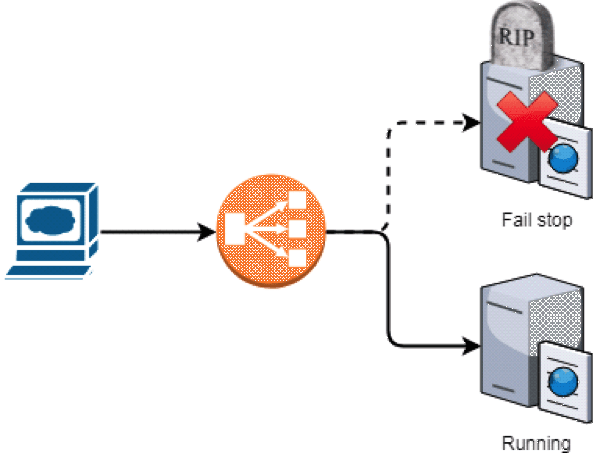
Reliable system design ensures continuous operation even when individual components fail. Fault tolerance is achieved by anticipating failures and designing mechanisms to recover gracefully. Redundancy, replication, and automated recovery strategies reduce downtime and data loss. Effective design isolates failures so that issues in one component do not propagate system-wide. Monitoring and health checks are integrated to detect problems early. This approach results in systems that maintain trust and availability in production environments.
Code / Tabular Example
| Reliability Mechanism | Design Technique | System Outcome |
|---|---|---|
| Redundancy | Multiple instances | High availability |
| Replication | Data duplication | Data safety |
| Health checks | Continuous monitoring | Early detection |
| Failover | Automatic switching | Minimal downtime |
Example
A payment processing system is designed with redundant servers across regions. If one server fails, traffic is automatically rerouted to a healthy instance. Data is replicated in real time to prevent loss. Monitoring tools detect anomalies and trigger alerts immediately. Customers experience uninterrupted transactions despite internal failures. This resilient design protects both revenue and user trust.
Use Cases
- Financial transaction systems
- Mission-critical enterprise software
- Cloud infrastructure services
- High-availability web applications
System Design and Software Architecture
Architectural Patterns in System Design
Monolithic vs Microservices Architecture
Explanation
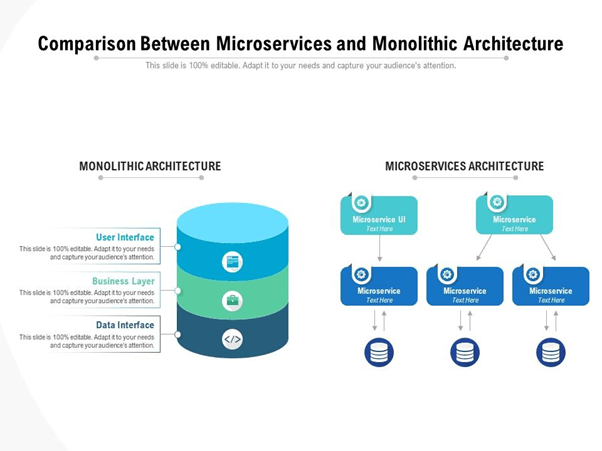
Architectural choice defines how software components are structured and deployed. A monolithic architecture combines all functionalities into a single deployable unit, making initial development straightforward. Microservices architecture decomposes the system into independent services that communicate over defined interfaces. This separation enables independent development, deployment, and scaling of services. System design determines which architecture aligns better with business scale, team size, and operational complexity. Choosing the right pattern early prevents architectural rigidity and scalability limitations later.
Code / Tabular Example
| Architecture Type | Structural Style | Long-Term Effect |
|---|---|---|
| Monolithic | Single codebase | Simple start, hard scaling |
| Microservices | Independent services | High scalability |
| Monolithic | Central deployment | Tight coupling |
| Microservices | Service-based deployment | Independent evolution |
Example
A small content management system starts as a monolithic application to speed up development. As user traffic grows, deployment becomes risky because any change affects the entire system. Migrating to microservices allows the search, content, and user services to scale independently. Teams can deploy updates without system-wide downtime. Performance improves as services are optimized individually. The architectural transition supports long-term growth.
Use Cases
- Startups transitioning to large-scale platforms
- Enterprise systems with multiple development teams
- Applications requiring frequent independent deployments
- High-traffic digital platforms
Layered and Modular Design Approaches
Separation of Concerns and Modularity
Explanation
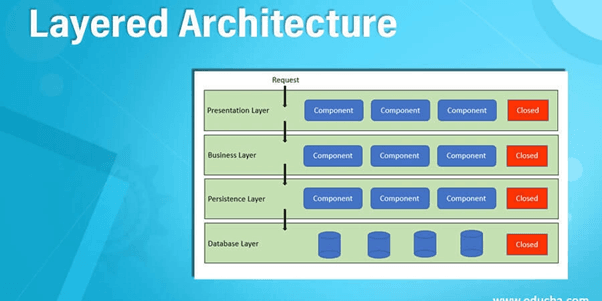
Separation of concerns divides a system into distinct layers, each handling a specific responsibility. This approach prevents business logic, data access, and presentation logic from being tightly coupled. Modular design enhances clarity by grouping related functionalities into reusable units. System design enforces boundaries that reduce ripple effects when changes occur. This structure improves testability and simplifies debugging processes. Over time, modular systems remain easier to maintain and extend.
Code / Tabular Example
| Design Layer | Responsibility | Benefit |
|---|---|---|
| Presentation | User interaction | Clean UI logic |
| Business Logic | Core processing | Reusable rules |
| Data Access | Database handling | Isolated persistence |
| Modules | Functional grouping | Easy maintenance |
Example
An enterprise inventory system separates user interfaces from business logic and data access layers. When the database technology changes, only the data access layer is modified. User interface updates do not affect core inventory calculations. Developers test each layer independently for accuracy. New modules such as analytics can be added without restructuring the entire system. This modular design ensures long-term stability.
Use Cases
- Enterprise applications with complex logic
- Systems requiring frequent UI updates
- Software needing long-term maintenance
- Multi-team development environments
System Design for Maintainability and Extensibility
Code Maintainability Through Design
Design Practices that Reduce Technical Debt
Explanation
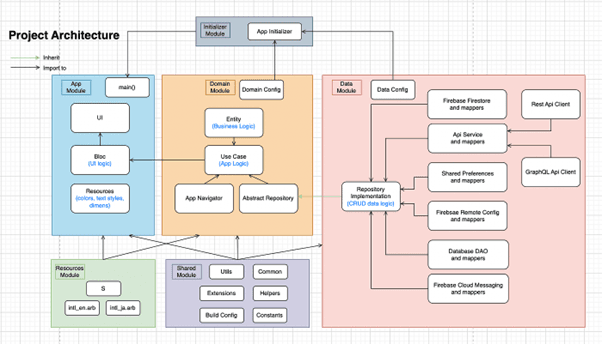
Maintainability-focused system design ensures that software remains easy to understand, modify, and debug over time. Clear architectural boundaries prevent tightly coupled components that are difficult to change independently. Consistent design patterns reduce cognitive load for developers working on the system. Well-defined interfaces allow internal changes without affecting dependent modules. This approach minimizes the accumulation of technical debt caused by quick fixes and shortcuts. As a result, maintenance effort and long-term costs are significantly reduced.
Code / Tabular Example
Example
A customer relationship management system is designed with clearly separated modules for leads, contacts, and reporting. When business rules change for lead qualification, only the relevant module is updated. Developers do not need to understand the entire system to make small changes. Code reviews become faster due to consistent structure. Bugs are isolated quickly without affecting unrelated features. Over time, the system remains clean and manageable.
Use Cases
- Enterprise applications with long lifespans
- Systems maintained by rotating development teams
- Software requiring frequent minor enhancements
- Products with ongoing regulatory changes
Extensible System Design
Designing Systems for Future Feature Expansion
Explanation
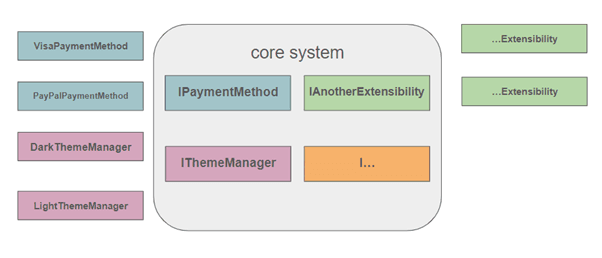
Extensible system design allows new features to be added without altering existing functionality. This is achieved by designing flexible architectures that support plugins, extensions, or configuration-based behavior. Loose coupling ensures that new components integrate smoothly with minimal impact. Design foresight helps accommodate future business requirements that are not yet fully known. This reduces redevelopment effort when expansion becomes necessary. Systems designed for extensibility adapt gracefully as user needs evolve.
Code / Tabular Example
| Extensibility Approach | Design Strategy | Expansion Advantage |
|---|---|---|
| Plugin architecture | External modules | Easy feature addition |
| Configuration-driven | Behavior via settings | No code changes |
| API-based extension | Defined contracts | Safe integration |
| Event-driven design | Decoupled reactions | Flexible growth |
Example
An analytics platform is designed with a plugin-based architecture. New data visualization features are added as plugins without modifying core logic. Third-party developers can build extensions using published APIs. Existing users experience no disruption when new features are introduced. Performance remains stable as extensions run independently. The system evolves continuously without major redesigns.
Use Cases
- SaaS platforms offering customizable features
- Products supporting third-party integrations
- Systems with rapidly evolving business needs
- Applications targeting diverse user requirements
System Design in Distributed and Cloud-Based Systems
Distributed System Design Fundamentals
Challenges of Consistency, Latency, and Partitioning
Explanation
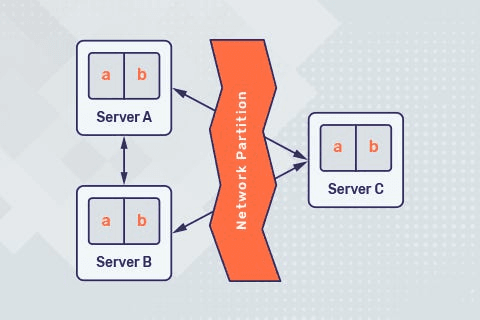
Distributed system design addresses the complexity of running software across multiple networked machines. Data consistency becomes difficult because updates may occur concurrently at different locations. Network latency affects response times and user experience, especially when services communicate frequently. Network partitions can isolate parts of the system, making some components temporarily unreachable. System design must balance these challenges through trade-offs that suit application requirements. Thoughtful design ensures predictable behavior despite the inherent uncertainty of distributed environments.
Code / Tabular Example
| Challenge | Design Concern | System Impact |
|---|---|---|
| Consistency | Data synchronization | Correctness |
| Latency | Network delays | Response time |
| Partitioning | Network failures | Availability |
| Trade-offs | CAP balance | System behavior |
Example
A global messaging application operates across multiple geographic regions. Messages must remain consistent while being delivered quickly to users worldwide. Network delays cause slight delivery differences between regions. Temporary network failures isolate certain servers without crashing the entire system. Designers accept eventual consistency to improve availability. The application continues functioning smoothly despite partial outages.
Use Cases
- Global web applications
- Real-time communication platforms
- Distributed databases
- Microservices-based systems
Cloud-Native System Design
Designing Systems for Elasticity and Cloud Scalability
Explanation
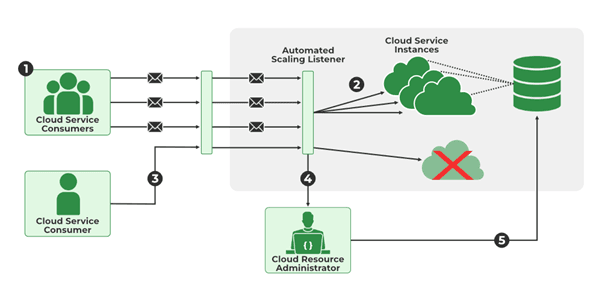
Cloud-native system design leverages cloud infrastructure to dynamically adjust resources based on demand. Elasticity allows systems to scale up during peak usage and scale down during low activity. This design minimizes cost while maintaining performance. Stateless services and managed cloud resources simplify scaling operations. Automated provisioning and monitoring enable rapid response to workload changes. Well-designed cloud-native systems achieve high availability with efficient resource utilization.
Code / Tabular Example
| Cloud Principle | Design Practice | Benefit |
|---|---|---|
| Elasticity | Auto-scaling | Cost efficiency |
| Stateless services | Externalized state | Easy scaling |
| Managed services | Cloud-native tools | Reduced ops effort |
| Automation | Infrastructure as code | Fast deployment |
Example
An online ticket booking platform experiences heavy traffic during event launches. The system automatically scales application servers to handle spikes. When demand drops, unused resources are released to reduce costs. Database services are managed by the cloud provider, ensuring high availability. Monitoring tools adjust capacity in real time. The platform delivers consistent performance without manual intervention.
Use Cases
- Cloud-hosted SaaS products
- Event-driven applications
- High-traffic consumer platforms
- Startups optimizing infrastructure costs
Security and Data Considerations in System Design
Security-Oriented System Design
Incorporating Security by Design Principles
Explanation
Security-focused system design embeds protection mechanisms directly into the architecture rather than adding them later. Access control, authentication, and authorization are defined early to prevent unauthorized interactions. Secure communication channels protect data in transit across system components. Design-level threat modeling helps identify vulnerabilities before implementation. Least-privilege principles reduce the potential impact of security breaches. This proactive approach strengthens system trustworthiness and compliance.
Code / Tabular Example
| Security Principle | Design Implementation | Security Benefit |
|---|---|---|
| Authentication | Identity verification | Controlled access |
| Authorization | Role-based permissions | Reduced misuse |
| Encryption | Secure communication | Data protection |
| Least privilege | Minimal access rights | Damage limitation |
Example
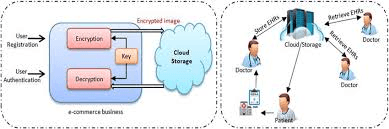
A healthcare application is designed with strict access controls for patient records. Only authorized roles can view or modify sensitive data. All communication between services is encrypted. Security checks are enforced at multiple architectural layers. Potential attack vectors are analyzed during design. This prevents data breaches and ensures regulatory compliance.
Use Cases
- Healthcare and medical systems
- Financial and banking applications
- Government and defense software
- Identity management platforms
Data Management and Storage Design
Designing Efficient and Scalable Data Storage Systems
Explanation
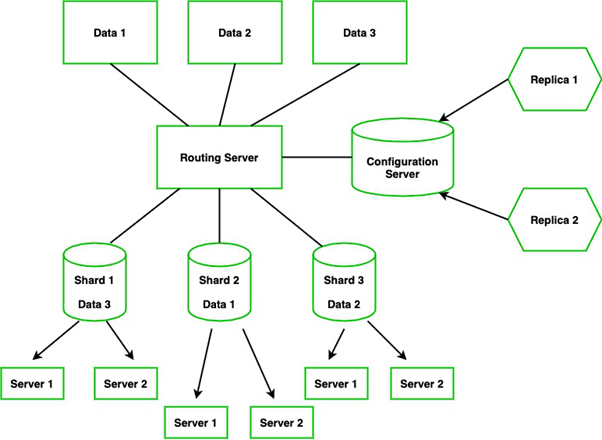
Data-centric system design ensures that storage solutions align with application access patterns. Choosing the right database type improves performance and scalability. Data partitioning and indexing optimize retrieval speed. Design decisions consider data growth, backup strategies, and recovery requirements. Efficient data models reduce redundancy and inconsistency. Well-planned storage architecture supports long-term system reliability.
Code / Tabular Example
| Storage Aspect | Design Strategy | Outcome |
|---|---|---|
| Database type | Relational or NoSQL | Performance fit |
| Partitioning | Sharding data | Scalability |
| Indexing | Optimized queries | Faster access |
| Backup | Redundant storage | Data safety |
Example
An analytics platform stores massive volumes of user activity data. Designers choose a distributed NoSQL database for horizontal scalability. Data is partitioned across nodes to balance load. Indexes are applied to frequently queried fields. Backup strategies ensure data recovery after failures. The system efficiently handles continuous data growth.
Use Cases
- Big data analytics platforms
- Transaction-heavy applications
- Data-driven SaaS products
- Systems with long-term data retention
System Design in Real-World Software Projects
System Design in Large-Scale ApplicationsDesigning for High Traffic and Large User Bases
Explanation
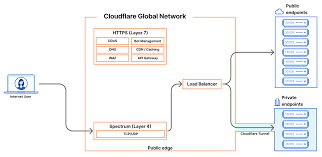
Large-scale applications require system designs that can sustain heavy and unpredictable user traffic. Architectural decisions must account for load distribution and efficient resource utilization. Caching strategies reduce repeated computations and database access. Asynchronous processing improves responsiveness under heavy load. System design ensures that traffic spikes do not degrade core functionality. These considerations enable stable performance as user numbers grow.
Code / Tabular Example
| Scalability Technique | Design Role | Performance Benefit |
|---|---|---|
| Load balancing | Traffic distribution | Stability |
| Caching | Fast data access | Reduced latency |
| Async processing | Non-blocking tasks | Higher throughput |
| Rate limiting | Traffic control | Abuse prevention |
Example
A social networking platform experiences millions of concurrent users. Requests are distributed across multiple servers using load balancers. Frequently accessed data is cached to reduce database pressure. Background tasks process notifications asynchronously. Rate limits prevent misuse during traffic surges. The platform remains responsive even during peak usage periods.
Use Cases
- Social media platforms
- Online marketplaces
- Video streaming services
- Massively used mobile applications
System Design Trade-offs and Decision Making
Balancing Performance, Cost, and Complexity
Explanation
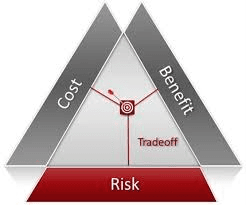
System design involves making trade-offs between competing requirements. Improving performance often increases infrastructure cost and architectural complexity. Simplifying design may reduce cost but limit scalability. Designers evaluate priorities based on business goals and constraints. Trade-off analysis prevents overengineering or underengineering systems. Balanced decisions lead to efficient and sustainable solutions.
Code / Tabular Example
| Design Factor | Optimization Focus | Trade-off Result |
|---|---|---|
| Performance | Faster processing | Higher cost |
| Cost | Resource efficiency | Limited scalability |
| Complexity | Simplified architecture | Reduced flexibility |
| Balance | Informed compromise | Sustainable system |
Example
A startup designs its backend to handle expected growth without excessive cloud costs. Performance optimizations are applied only to critical paths. Non-essential features use simpler architectures. As revenue increases, more advanced solutions are introduced. This balanced approach avoids unnecessary expenses. The system evolves in line with business growth.
Use Cases
- Budget-constrained startups
- Enterprise systems with cost controls
- Rapidly evolving products
- Long-term software platforms
Conclusion
System design is a fundamental discipline that determines the long-term success of software systems. Across all stages of development, it provides structure, predictability, and clarity, enabling teams to manage complexity effectively. Thoughtful system design ensures that software remains scalable, secure, maintainable, and adaptable as requirements evolve. It reduces technical debt, minimizes operational risks, and aligns technical solutions with business objectives. Ultimately, strong system design transforms software development from short-term problem solving into the creation of sustainable and high-quality systems.
Additional Readings
To deepen understanding of system design principles and real-world applications, the following resources provide authoritative and practical insights.
“Designing Data-Intensive Applications” by Martin Kleppmann offers a comprehensive view of data systems, scalability, and reliability.
“Software Architecture in Practice” by Len Bass, Paul Clements, and Rick Kazman explains architectural concepts and trade-offs in large systems.
The official documentation of major cloud providers such as AWS, Google Cloud, and Microsoft Azure provides practical guidance on cloud-native system design.
Engineering blogs from organizations like Netflix, Uber, and Google share real-world system design challenges and solutions.
Research papers and articles from ACM and IEEE explore advanced topics in distributed systems and software architecture.
Links to Refer From ALMABETTER Website.
AlmaBetter provides several resources that discuss System Design, its architectural principles, and why it is a critical skill for modern software developers.
Here are the most relevant links from the AlmaBetter website regarding the importance and application of System Design:
1. Core Articles on System Design & Architecture
- Exploring the System Design of Google Maps This article explicitly highlights the importance of system design in software engineering, describing it as the "foundation for any software product." It breaks down how a large-scale system like Google Maps uses high-level design (HLD) and low-level design (LLD) to manage billions of requests.
- Architecture of Operating System - Basics, Types, Structures While focused on OS, this piece covers the fundamental architectural layers (Kernel, Shell, etc.) that every system designer must understand. It explains how different architectures (Monolithic vs. Microkernel) impact system stability and performance.
- Node.js Architecture: A Complete Guide This guide discusses the Event-Driven Architecture and how choosing the right system design (like non-blocking I/O) allows applications to scale efficiently. It is a great resource for understanding software-specific design patterns.
2. Specialized Design Topics
- Database Design in DBMS System design is incomplete without data management. This article explains how a well-designed database ensures data integrity, scalability, and performance—key goals of the overall system design process.
- Big Data Architecture: Definition, Components, and Challenges Focuses on the "blueprint" for handling vast datasets. It illustrates how system design principles are applied to data ingestion, storage, and processing layers in modern tech stacks.
- Docker Architecture and Its Components Explains the architecture behind containerization, a vital part of modern distributed system design. It details how Docker's design enables consistent deployment and scaling.
3. Career & Interview Perspectives
- A Comprehensive DSA Roadmap for Beginner to Advanced In the "Specialized Preparation" section, this roadmap lists System Design and Object-Oriented Design principles as essential topics for landing senior software engineering roles and excelling in technical interviews.
- Top MAANG Interview Questions for AI Roles This article emphasizes that top tech companies (MAANG) evaluate candidates on "system design at scale." It explains that understanding trade-offs in design is what separates a surface-level developer from a professional architect.







 in Bengaluru, India


 in Bengaluru, India
