

Your Success, Our Mission!
6000+ Careers Transformed.
Explanation:
A Java class forms the fundamental building block of every Java application. It encapsulates both data (variables) and behaviour (methods), creating a blueprint from which objects are instantiated. The class structure enforces modularity by separating responsibilities into logically grouped units. Java classes typically include:
• A class declaration using the class keyword
• Access modifiers that determine visibility
• Fields representing the state of an object
• Methods representing operations or behaviours
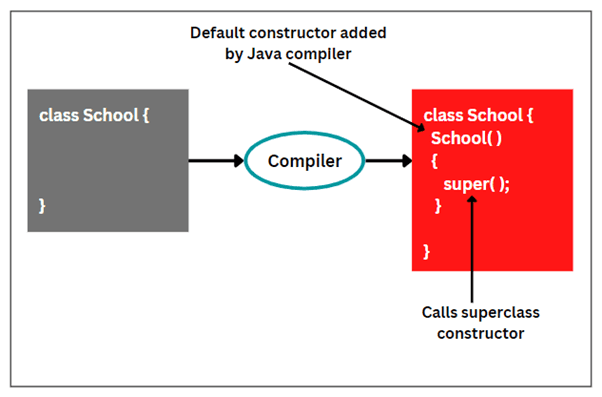
• Constructors used to initialize new objects
This structure supports Java’s object-oriented paradigm, enabling encapsulation, reusability, and maintainability. In large-scale enterprise applications, well-organized class structures contribute significantly to system scalability and debugging efficiency.
Code:
public class Car {
    private String model;
    private int speed;

    public Car(String model, int speed) {
        this.model = model;
        this.speed = speed;
    }

    public void accelerate(int value) {
        speed += value;
    }

    public int getSpeed() {
        return speed;
    }
}
| Component | Purpose | Example |
|---|---|---|
| Fields | Store object state | model, speed |
| Constructor | Initializes objects | Car("BMW", 120) |
| Methods | Define behavior | accelerate(), getSpeed() |
| Access Modifiers | Control visibility | public, private |
Technical Example:
A Java backend application defines classes representing users, payments, products, and transactions. Each class encapsulates its own data and behavior while interacting with others through method calls.
Use Cases:
• Designing enterprise application modules
• Domain-driven design modeling
• Building reusable software components such as libraries and frameworks
Explanation:
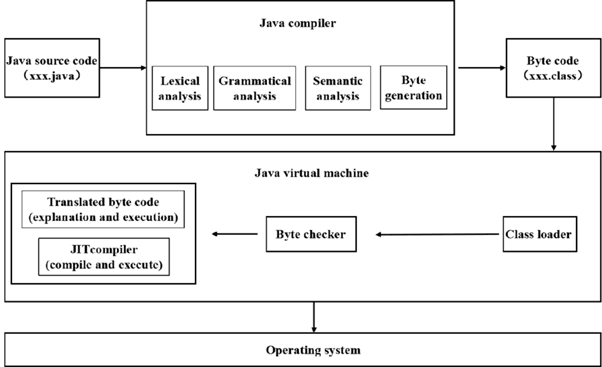
The main() method serves as the entry point of a Java application. When a Java program runs, the JVM looks for the exact signature:
public static void main(String[] args)
Each keyword has a specific purpose:
• public – Accessible from anywhere
• static – Can run without creating an object
• void – Returns no value
• String[] args – Accepts command-line arguments
The main() method is essential for standalone applications but not required for enterprise Java (e.g., web apps), where servers like Tomcat or Spring Boot manage entry points. Understanding its behavior is critical for writing executable Java programs and debugging initial program flow.
Code:
public class Demo {
    public static void main(String[] args) {
        System.out.println("Java program started.");
    }
}
| Part | Meaning | Importance |
|---|---|---|
| public | JVM can access it | Required by specification |
| static | No object needed | Program begins instantly |
| void | No return | Consistent calling convention |
| args | Command-line input | Enables parameterized execution |
Technical Example:
A command-line utility takes input arguments from the user through the main method and performs actions such as file processing or database queries.
Use Cases:
• Building command-line tools
• Debugging application startup logic
• Writing standalone utilities or scripts
Top Tutorials

CNN in Deep Learning 2026
A beginner-friendly guide to CNNs: understand deep learning essentials, create Python-based models, and explore advanced applications.

Breaking The Limits: Scaling Databases with MySQL Partitioning
Learn MySQL partitioning with examples. Improve query performance, scalability, and data management using RANGE, LIST, HASH, KEY, and composite techniques.

ML in Action: Hands-On Guide to Deploying and Serving Models
Learn model deployment and serving—from concepts to real-world architectures, tools, APIs, containers, and cloud workflows for production-ready ML.

 in Bengaluru, India


All Courses (6)
Master's Degree (2)
Fellowship (2)
Certifications (2)


 Java Program Structure




 in Bengaluru, India